Showing posts with label arrives. Show all posts
Showing posts with label arrives. Show all posts
Sunday, April 9, 2017
Instagram Arrives On Windows Desktops
Instagram Arrives On Windows Desktops
Following the launch of its app on Windows Mobile in April, Instagram has finally brought its visual social network to Windows desktops as a standalone app.
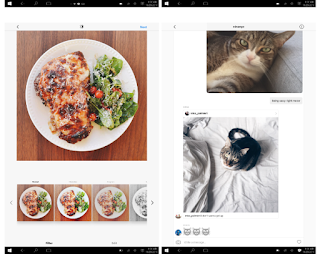
The newly launched Instagram windows app lets you browse your feed, view Stories, as well as check and send direct messages. It also offers search, the Explore tab, and access to your profile, liked posts and settings. And unlike the Web app, it also offers sharing options for Facebook and Messenger from the context menu (click the ‘…’ button to access it).
Instagram says any device running Windows 10 can use its app, which is available for download in the Windows App Store. Although, for Windows 10 devices other than tablets and smartphones, it notes certain features may not be supported — such as capturing and uploading videos or photos. The app requires a touchscreen Windows 10 device to actually upload content.
The app, which is better suited to tablets at the moment, needs a lot of work to accommodate desktop users. For one thing, the main interface only takes up the center of your screen, leaving plenty of white space on either side. That space could’ve been better utilized to display comments next to photos in your feed, similar to how the Web app shows individual posts.
Not just that the app alsocrashes when you try to add a Story, if you’re using a machine without a backward-facing camera. It’d be best to either hide this button or simply allow people to upload images and video on whatever device they have. There’s also a Live Tile which should ideally rotate images from your feed in your Start menu, but I haven’t been able to get it to work yet.
We are looking forward to see this issues fixed – and perhaps even get the ability to post from any PC, camera or not – in a future release to enable people enjoy the Instagram windows App.
The newly launched Instagram windows app lets you browse your feed, view Stories, as well as check and send direct messages. It also offers search, the Explore tab, and access to your profile, liked posts and settings. And unlike the Web app, it also offers sharing options for Facebook and Messenger from the context menu (click the ‘…’ button to access it).
Instagram says any device running Windows 10 can use its app, which is available for download in the Windows App Store. Although, for Windows 10 devices other than tablets and smartphones, it notes certain features may not be supported — such as capturing and uploading videos or photos. The app requires a touchscreen Windows 10 device to actually upload content.
The app, which is better suited to tablets at the moment, needs a lot of work to accommodate desktop users. For one thing, the main interface only takes up the center of your screen, leaving plenty of white space on either side. That space could’ve been better utilized to display comments next to photos in your feed, similar to how the Web app shows individual posts.
Not just that the app alsocrashes when you try to add a Story, if you’re using a machine without a backward-facing camera. It’d be best to either hide this button or simply allow people to upload images and video on whatever device they have. There’s also a Live Tile which should ideally rotate images from your feed in your Start menu, but I haven’t been able to get it to work yet.
We are looking forward to see this issues fixed – and perhaps even get the ability to post from any PC, camera or not – in a future release to enable people enjoy the Instagram windows App.
Available link for download

Friday, January 27, 2017
Beware on New Android Malware App Arrives
Beware on New Android Malware App Arrives
Beware on New Android Malware App Arrives Beware on New Android Malware App Arrives
Beware on New Android Malware App Arrives Beware on New Android Malware App Arrives
A new little bit of malware is circulating throughout the Google Play store. This malware, called "BadNews" is hidden away inside over thirty totally different apps. So far, these apps have been downloaded a couple of million times. A security company by the name of Lookout has discovered the apps, and there can be more of the apps within the Play store.

How The Malware Was spread
This time around, it is not the fault of app developers. The BadNews app was unfold through an ad framework. Developers with sensible intentions in all probability simply used the incorrect ads, and these ads were infected with the malware. Google has created several tries to crack down on malware inside the Play store, however this is often an almost not possible feat when it comes to robot.
What the Malware does
BadNews is admittedly bad news. when downloaded, this malware can fake pretend alerts that asks users to download other infected apps. If those apps are downloaded, one app can in secret sign users up for prime priced SMS services without the data of the phone owner. in addition, your sign and ID are sent back to the malware base, and this data is recorded.
For some reason, most of the apps on Lookouts warning list are targeted directly at Russian android users. Google has managed to drag more than thirty apps from the store that contain this little bit of malware. But, a lot of apps that are infected can be lurking. a way to search out out if an app is infected is to go to the Lookout homepage. Or, simply do not download any apps that appear to be targeted at Russian users.
Androids current Problem
The problem with android is that its very easy for virus spreaders to tap into the system. Its even easier for those with bad intents to unfold malware throughout android, and to send malware infested apps to millions of users. So far, Google has tried to place a stop to any or all of those issues, however the company cannot do a lot of in the end.
Can any OS be malware infected? Sure; however android is way more susceptible to malware just because its not as secure as an OS like iOS. What are you able to do if you have got an android phone and love android (and would neer switch to iOS)? youll begin by keeping up up to now on all the most recent malware issues. youll also make certain not to download any apps that contain malware.
What youll be able to Do
But, during this case, it is not the fault of anybody particular developer, thus its exhausting to inform an infected app from a good one. simply be vigilant, and if you notice that your phone is acting funny, seek help. Right now, it looks that almost all of the BadNews apps are contained, however a few more might surface in time. get on the lookout, and let me apprehend if you come across any further android infected apps. Or, let me know if you have got already downloaded one!
Beware on New Android Malware App Arrives Beware on New Android Malware App Arrives
Beware on New Android Malware App Arrives
A new little bit of malware is circulating throughout the Google Play store. This malware, called "BadNews" is hidden away inside over thirty totally different apps. So far, these apps have been downloaded a couple of million times. A security company by the name of Lookout has discovered the apps, and there can be more of the apps within the Play store.
How The Malware Was spread
This time around, it is not the fault of app developers. The BadNews app was unfold through an ad framework. Developers with sensible intentions in all probability simply used the incorrect ads, and these ads were infected with the malware. Google has created several tries to crack down on malware inside the Play store, however this is often an almost not possible feat when it comes to robot.
What the Malware does
BadNews is admittedly bad news. when downloaded, this malware can fake pretend alerts that asks users to download other infected apps. If those apps are downloaded, one app can in secret sign users up for prime priced SMS services without the data of the phone owner. in addition, your sign and ID are sent back to the malware base, and this data is recorded.
For some reason, most of the apps on Lookouts warning list are targeted directly at Russian android users. Google has managed to drag more than thirty apps from the store that contain this little bit of malware. But, a lot of apps that are infected can be lurking. a way to search out out if an app is infected is to go to the Lookout homepage. Or, simply do not download any apps that appear to be targeted at Russian users.
Androids current Problem
The problem with android is that its very easy for virus spreaders to tap into the system. Its even easier for those with bad intents to unfold malware throughout android, and to send malware infested apps to millions of users. So far, Google has tried to place a stop to any or all of those issues, however the company cannot do a lot of in the end.
Can any OS be malware infected? Sure; however android is way more susceptible to malware just because its not as secure as an OS like iOS. What are you able to do if you have got an android phone and love android (and would neer switch to iOS)? youll begin by keeping up up to now on all the most recent malware issues. youll also make certain not to download any apps that contain malware.
What youll be able to Do
But, during this case, it is not the fault of anybody particular developer, thus its exhausting to inform an infected app from a good one. simply be vigilant, and if you notice that your phone is acting funny, seek help. Right now, it looks that almost all of the BadNews apps are contained, however a few more might surface in time. get on the lookout, and let me apprehend if you come across any further android infected apps. Or, let me know if you have got already downloaded one!
Available link for download
Subscribe to:
Posts (Atom)