Showing posts with label 00k. Show all posts
Showing posts with label 00k. Show all posts
Monday, January 23, 2017
2017 Airtel 0 00K Free Browsing Cheat Via Tweakware VPN
2017 Airtel 0 00K Free Browsing Cheat Via Tweakware VPN
I was surfing in the night, then I saw a pop up notification,behold it was from Google play store , the update reads An update is available to download and it was tweakware VPN and I clicked on it and checked on whats new, it was "Bug Fixes" and "New Airtel 0.0k Settings".

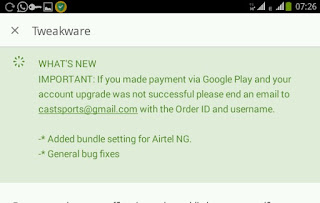
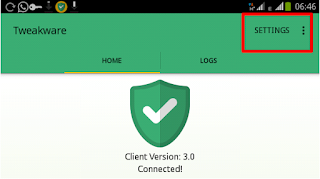


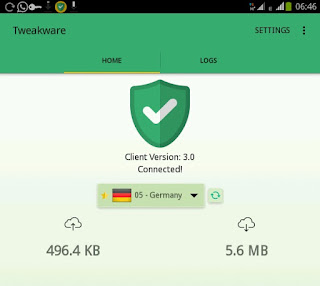
From the above you can see that , I was able to connect and browse with my Airtel sim, I have use more than 5mb since I connect my tweakware VPN.
I was happy , because when it comes to tweakware VPN , connection is excellent, no hitches like psiphon handler VPN, the previous day I tried psiphon handler apk with my Airtel Sim it was not connecting.
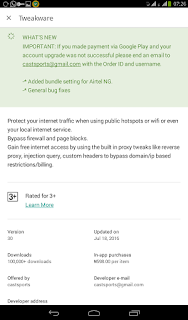
But now tweakware VPN has added Airtel free browsing with 0.0k airtime to it bundle settings and it is streaming and downloading faster than psiphon handler apk, in fact ,I have to dump my ETISALAT and Glo Sim in other to use Airtel free browsing on tweakware .
Below I am going to show you settings on how to use the Airtel free browsing on tweakware to browse unlimited without recharging your sim card
Requirements
Android phone with full 3G network Coverage.
Lastest Version of TweakWare VPN for Android which can be downloaded Here>> Download TweakWare VPN V4.7. apk ( Play Store)
Direct Download For Tweakware 4.7 here >> Tweakware 4.7.apk
Direct Download For Tweakware 4.7 here >> Tweakware 4.7.apk
Steps
1. Download Tweakware VPN version 4.7 on Google play
2.Launch Tweakware app and Click on Settings
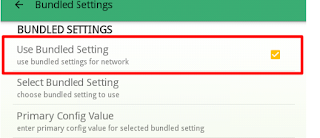
3.Select bundle settings
4. Tick Use bundle settings.
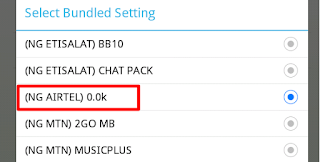
5. Select bundle settings and tick Airtel 0.0k.
6.Then go back to connect.
Note: To Enjoy this Tweakware settings on Airtel network you need to upgrade your tweakware account to premium, because the free servers is not connecting fast, but with premium servers you enjoy fast unlimited speed of browsing, streaming and downloading.
Available link for download

Sunday, January 15, 2017
Psiphon Etisalat Unlimited Free Browsing On Android Device With N0 00k
Psiphon Etisalat Unlimited Free Browsing On Android Device With N0 00k
Etisalat Unlimited surfing with Psiphon handler, without any recharge card or data subscription is back (NGN 0.0K). what you need in this settings is a free working proxy server that enables you to browse free , which I will share in the steps below , with the free working proxy server, you can watch video, browse and download at a high speed, even though etisalat bblited with normal Android phone has stopped working, i think this is the best alternative to surf freely.
- Install on your Android Device And Open it to add the settings below.
- Get Etisalat Sim with 0.00k in it
- A Full H+/3G Coverage
First of all use the default APN settings for etisalat :
- APN >>>etisalat.
- Proxy >> Leave it blank.
- Port >> Leave it blank.
- Save and come back to open Psiphon handler .
Open the Psiphon handler and add the following settings.
- Tick Remove Port .
- Proxy Type: Real Host.
- Proxy Server :http://ent.nxtfwd.com/s/d/etisalat_ng#openModal
- Real Proxy Type : HTTP
- Choose United States as your preferred Server .
- Click More options and untick Connect Through HTTP Connection.
Image Guide.


DATA CAPPING SOLUTION.
Some users of the etisalat free browsing cheat complained about data capping, and they were able to use about 55mb/s total data usage. Hence the solution to this , is by going to Psiphon handler Application information and clear data and repeat the steps above ,then change the proxy server to >> ent.nxtfwd.com/s/d/etisalat_ng#openModal , and reconnect Psiphon handler again.
Settings For Latest Etisalat Unlimited Free Browsing 0.00k
- Download Latest version of Psiphon handler >> Psiphon Pro handler. apk- Install on your Android Device And Open it to add the settings below.
- Get Etisalat Sim with 0.00k in it
- A Full H+/3G Coverage
First of all use the default APN settings for etisalat :
- APN >>>etisalat.
- Proxy >> Leave it blank.
- Port >> Leave it blank.
- Save and come back to open Psiphon handler .
Open the Psiphon handler and add the following settings.
- Tick Remove Port .
- Proxy Type: Real Host.
- Proxy Server :http://ent.nxtfwd.com/s/d/etisalat_ng#openModal
- Real Proxy Type : HTTP
- Choose United States as your preferred Server .
- Click More options and untick Connect Through HTTP Connection.
Image Guide.
DATA CAPPING SOLUTION.
Some users of the etisalat free browsing cheat complained about data capping, and they were able to use about 55mb/s total data usage. Hence the solution to this , is by going to Psiphon handler Application information and clear data and repeat the steps above ,then change the proxy server to >> ent.nxtfwd.com/s/d/etisalat_ng#openModal , and reconnect Psiphon handler again.
Available link for download
Subscribe to:
Posts (Atom)