Showing posts with label manager. Show all posts
Showing posts with label manager. Show all posts
Saturday, March 25, 2017
Solid Explorer File Manager 2 1 18 Mod Apk Plugins Pro Cracked Android Application
Solid Explorer File Manager 2 1 18 Mod Apk Plugins Pro Cracked Android Application
Solid Explorer File Manager 2.1.18 Apk Mod Plugins Pro [Update][Unlocked]

Download Links:
- Solid Explorer File Manager 2.1.18 Download Page
Available link for download

Saturday, March 18, 2017
ES File Explorer File Manager Pro 4 1 4 Apk Mod Cracked Android Application Download
ES File Explorer File Manager Pro 4 1 4 Apk Mod Cracked Android Application Download
ES File Explorer File Manager Pro 4.1.4 Apk Mod + Classic Theme [Latest][ANDROID]

Download Links:
- ES File Explorer File Manager Pro 4.1.4 Download Page
Available link for download
Tuesday, March 14, 2017
Download RAM Manager Pro v8 6 1 APP APK
Download RAM Manager Pro v8 6 1 APP APK
Free download RAM Manager Pro v8.6.1 APP APK from zippyshare, uploaded, mediafire, mega, 4Shared & torrent. Dengan download ram manager v8.6.1 apk kinerjaram pada hp kamu akan meningkat, hp yang biasanya lemot, serig hang / force closeakan bisa teratasi jika kalian install ram manager pro v8.6.1. Download Free RAM Manager Pro with Direct Link RAM Manager Pro new Apk Latest version Update is Here.

Salah satu aplikasi yang mendukung performa Android untuk menjadi lebih baik adalah ram manager pro free apk download. Pada aplikasi Ram Manager Versi 8.6.1 For Android versi terbaru ini bekerja sangat baik terutama untuk meningkatakan kinerja dan juga dan optimasi pada RAM yang ada di smartphone android kamu.
Download RAM Manager Pro v8.6.1 Apk Full Version Free
Version: 8.6.1 | File Size: 3.94 MB
Updated: 2016/09/03
Downloads Now
Available link for download
Monday, March 13, 2017
Root Browser File Manager 2 2 4 0 APK Download for Android
Root Browser File Manager 2 2 4 0 APK Download for Android
 |
| Root-Browser-APK |
You are downloading Root Browser APK latest version available here in this webpage to free download. This v2.2.4.0 version is recently updated for all Android devices or smart phones.
Root Browser APK is another All-In-One ultimate (file manager) for only android rooted devices, which help you to easily explore android mobile phone files to control on your android phone or tablet. It is developed by JRummy Apps, latest updated on May 2016. With Root Browser file manager APK, you can also explore jar files, rar files, apk files and zip files by help of this application. In the app, 2 file managers are available in one Root Browser app. By help of these file manager you can move any folder/file to one place to another place and delete files or folders and much more easily. So download Root Browser v2.2.4.0 APK current version from our site and install on your android phone to explore android mobile phone files to control on your android phone or tablet. Before downloading and installing don’t miss its some main features, the features are listed here.
Features of Root Browser v2.2.4.0 APK:
- Type folders or files name to search and find easily.
- 2 ultimate file managers are available in one Root Browser app.
- Create folder or files and delete it.
- Allow you to bookmark any file or folder.
- Copy any file or folder and paste in all you want.
- Also allow you to explore jar files, rar files, apk files and zip files.
- Rename any file or folder name and move one place to another place.
- Sort by date, file size and name easily.
- Extract files from jars or zip or apk.
- Send files or folder by Bluetooth, Email and etc.
- And much more.
 |
| Screen-Shoots-of-Root-Browser-v2.2.4.0-APK |
File Details:
File Name: Root Browser APK
APK Size: 2.6 MB
Version: 2.2.4.0 (Updated)
Android Requires: 1.6 to higher
Developer Name: JRummy Apps Inc
Price: 100% free
Download Links:
Root Browser v2.2.4.0 APK >> Download APK (2.6 MB)
Remember that, if Root Browser APK is not support with your phone or any problem then you may try Root Explorer APK from our site.
Available link for download
Wednesday, March 8, 2017
ASTRO File Manager APK Latest Version Free Download for Android
ASTRO File Manager APK Latest Version Free Download for Android

Download Free ASTRO File Manager Latest v4.6.3.4 [APK]
ASTRO File Manager App APK is a powerful tool for managing files and applications that allow us to work directly with our files in the cloud (via Dropbox, Google Drive or SkyDrive), or via a local network that can be configured from the application itself.. Thanks to Latest Version of ASTRO File Manager APK we can manage all the resources of our Android Phone easily and can access any element of it and share it if they so want: upload photos, watch videos or manage 3G phone connection is very simple.
When we are working with our files have the classic possibilities that are used in desktop computers, such as copy, paste, cut, create, delete or rename; but we can also send to any friend through email. In the same way, we can decompress files in ZIP or RAR format, access the contents of documents in many different formats, and even access the contents of your computer through a WiFi network (on configuration thereof). ASTRO File Manager (ASTRO File Manager APK in Spanish) is an excellent file manager for Android, thanks to which we can work with all our Android terminal documents comfortably and quickly.
Required Android:
- 2.2 and up
Note:
When you click the following link it will redirect you to a new page where you will see a download button, just click that button and your download will start automatically in 15 to 20 Seconds. IF it will pop up to a new tab then once again click the download button and your APK will start downloading.
Click Here To Download Free ASTRO File Manager Latest v4.6.3.4 APK From Media Fire
Click Here To Download Free ASTRO File Manager Latest v4.6.3.4 APK From Userscloud
Available link for download
Sunday, February 26, 2017
Internet Download Manager 6 25 Build 25
Internet Download Manager 6 25 Build 25

Internet Download Manager 6.25 Overview
is a reliabe and very useful tool with safe multipart downloading technology to accelerate from internet your downloads such a video, music, games, documents and other important stuff for you files. IDM has a smart download logic accelerator and increases download speeds by up to 5 times, resumes and schedules downloads. Comprehensive error recovery and resume capability will restart broken or interrupted downloads due to lost connections, network problems, computer shutdowns, or unexpected power outages. Simple graphic user interface makes Internet Download Manager user friendly and easy to use. Unlike other download managers and accelerators, IDM segments downloaded files dynamically during download process and reuses available connections without additional connect and login stages to achieve best acceleration performance.
Downloads

Direct Download
Available link for download
Saturday, February 11, 2017
Internet Download Manager APK File Latest Version Free Download For Android
Internet Download Manager APK File Latest Version Free Download For Android
Internet Download Manager “IDM” Pro APK File Latest Version Free Download
You are about to download and install IDM internet download manager full APK file updated version for all android phones and tablets. If you are interested to download MP3, MP4, Music, Videos etc from internet, Then IDM is the most helpful android app for you and your android devices.Click here ot free download.
Free Download
Available link for download
Monday, January 23, 2017
File Commander File Manager Premium 3 9 14630 Apk Mod Android Cracked Application
File Commander File Manager Premium 3 9 14630 Apk Mod Android Cracked Application
File Commander File Manager Premium 3.9.14630 Apk Mod [ANDROID]

Download Links:
- File Commander File Manager Premium 3.9.14630 Download Page
Available link for download
Wednesday, January 18, 2017
How to Crack Internet Download Manager for Lifetime Activation
How to Crack Internet Download Manager for Lifetime Activation
Internet download manager is the fastest and most recommended download accelerator for PC users that helps to increase download speed with built-in download logic accelerator, resumes and also schedules downloads.
 The software is very common software used by internet users, especially for heavy downloader, but the Internet download manager software gives a trial period of only 30days. However, most internet users have been looking for ways to bypass the trial period and make use of the software unlimited without getting the registration prompt issue, but no avail.
Simply follow the guide below, it’s the easiest method.
1. Firstly, download the Internet download manager along with a patch file here.
2. After that, make sure that you’ve uninstalled any existing IDM on your computer.
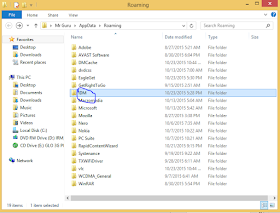
3. Now, press win+R and paste “%APPDATA%” and any existing IDM folder would be searched for, just as seen in the image below.

4. Once you get to see an IDM folder, simply delete it and proceed.
5. After that, open the file you downloaded in step 1, and extract the folder in the zip file to your desktop screen.
6. Open the folder and install the normal internet download manager.
7. Go to your task manager, and make sure that you’ve closed all running IDM program on your computer.
8. After that, launch the patch file. Make sure you run as administrator.
9. Click on patch and wait few seconds till patch is completed.
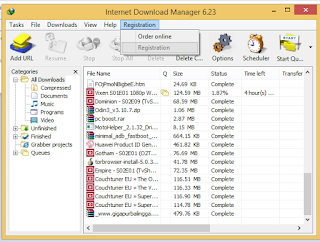
10. You can now open your internet download manager, go to registration, and you’ll notice that the registration option is disabled.
In the below guide, I would walk you through the process on how to quickly crack the Internet download manager (IDM) for lifetime activation.
Simply follow the guide below, it’s the easiest method.
1. Firstly, download the Internet download manager along with a patch file here.
2. After that, make sure that you’ve uninstalled any existing IDM on your computer.
3. Now, press win+R and paste “%APPDATA%” and any existing IDM folder would be searched for, just as seen in the image below.
4. Once you get to see an IDM folder, simply delete it and proceed.
5. After that, open the file you downloaded in step 1, and extract the folder in the zip file to your desktop screen.
6. Open the folder and install the normal internet download manager.
7. Go to your task manager, and make sure that you’ve closed all running IDM program on your computer.
8. After that, launch the patch file. Make sure you run as administrator.
9. Click on patch and wait few seconds till patch is completed.
10. You can now open your internet download manager, go to registration, and you’ll notice that the registration option is disabled.
That’s it. You can now flex your Internet download manager for lifetime usage. Feel free to share this trick with your friends. If you encounter any difficulty, feel free to let me know via comment section.
Available link for download
Subscribe to:
Posts (Atom)