Showing posts with label to. Show all posts
Showing posts with label to. Show all posts
Sunday, April 9, 2017
The Only Way To Browse Free On Your MTN SIM
The Only Way To Browse Free On Your MTN SIM
Do you want to browse free without any restriction on your mtn line? you dont need to suffer your self other than having Seventy Naira on Your MTN Line, for the past six months i have been enjoying this offer , just follow the steps below on how to setup your free browsing with MTN SIM..

Step 1:
Goto Settings On Your Android phone and Locate Apn (Access Point Name ), and add
Proxy : 10.199.212.2
port: 8080 and then save.
Step 2:
Download Psiphon Handler >> HERE (3mb)<<
Install and launch launch Psiphon Handler and then goto handler menu and change
PROXY TYPE to Real Host in the drop down options
locate Proxy Server in the Handler menu and add:
"web.blackberry.com" as proxy sever without quote eg. web.blackberry.com then save and continue.
Step 3:
Still in the Psiphon handler Tick "tunnel Whole device"
Step 4:
Go to options tab in psiphon handler and locate "More Options", Next is for you to tick "connect through HTTP Proxy, then also thick "use the following settings" and the following:
Proxy: 10.199.212.2
Port: 8080.
Step 5:
Load NGN100 recharge card then dial *216*3*1#, NGN70 will be deducted, after a confirmation message stating that "Welcome to the BB10 daily subscription...etc" , launch and start psiphon handler to connect and start browsing unlimited without any restrictions for 24 hours.
Step 1:
Goto Settings On Your Android phone and Locate Apn (Access Point Name ), and add
Proxy : 10.199.212.2
port: 8080 and then save.
Step 2:
Download Psiphon Handler >> HERE (3mb)<<
Install and launch launch Psiphon Handler and then goto handler menu and change
PROXY TYPE to Real Host in the drop down options
locate Proxy Server in the Handler menu and add:
"web.blackberry.com" as proxy sever without quote eg. web.blackberry.com then save and continue.
Step 3:
Still in the Psiphon handler Tick "tunnel Whole device"
Step 4:
Go to options tab in psiphon handler and locate "More Options", Next is for you to tick "connect through HTTP Proxy, then also thick "use the following settings" and the following:
Proxy: 10.199.212.2
Port: 8080.
Step 5:
Load NGN100 recharge card then dial *216*3*1#, NGN70 will be deducted, after a confirmation message stating that "Welcome to the BB10 daily subscription...etc" , launch and start psiphon handler to connect and start browsing unlimited without any restrictions for 24 hours.
Available link for download

Thursday, April 6, 2017
iOS 10 is Now Available How To Update
iOS 10 is Now Available How To Update
Apple has officially released its latest mobile operating system iOS 10 today with amazing feature.
 The iOS 10 comes with security enhancements as well as a bunch of new features. There are a ton — an eccentric new version of iMessage with its own App Store, new powers for Siri, a redesigned home screen, rich notifications and much more. Continue below to see how to upgrade and some features of the iOS 10.
How to update to iOS 10
Make sure you have a decent Wi-Fi connection and your phone is either charging or has more than 50 percent battery left.
Then, go over to settings and press ‘general’. When you hit the Software Update button everything will speak for itself. Within minutes your phone will be updated and more secure phone.
Available link for download
Wednesday, April 5, 2017
How To Start a Blog and Make Money
How To Start a Blog and Make Money
How To Start a Blog and Make Money

Hi Guys Today I am going to Explain you How to Create Your Own working Blog free.
let me clear to you this tutorials is for beginners. and you DON’T need any knowledge of HTML, coding or graphics design.
The good news is that the free step-by-step guide on this site removes any confusion from the process, and requires only the most basic computer skills. So whether you’re 8 or 88, you can have your blog ready to go in less than 20 minutes.
Steps to making a blog.
STEP 1: Know WHY you want to start a blog.
STEP 2: Decide WHAT your blog will focus on. ...
STEP 3: Decide WHICH of the blogging platforms youll use. ...
STEP 4: Decide which web host to use. ...
STEP 5: How to create a blog using WebHostingHub.
STEP 6: Login to your new blog and start blogging.
STEP 1: Know WHY you want to start a blog
When you know your destination, getting your direction becomes easier, right?
People start blogs for different reasons. Today, blogging is a great way to:
Become a better person. Blogging helps you think clearer, communicate with intentionality and build your creative flair.
Improve your writing. Writing proficiency comes with regular practice and starting a blog helps you write regularly
Make your voice heard. Gone are the days when only powerful politicians and wealthy businessmen could air their views. Now, you, too, can!
Make a difference. You want to help people take control of their personal finance? Start your own blog. You wish people would exercise more, take healthier meals and rest better? Start a blog.
Get published. The world is changing, and traditional publishers are falling into irrelevance. Smart authors now make a blog, build a loyal audience and publish their works. This approach works always.
Make money. It takes time and commitment but people make real money from blogs. I’ve made tens of thousands of dollars myself from blogging. And many folks I’ve taught how to create a blog are doing fine too.
If you’re still undecided, see: 34 Reasons Why You Should Start A Blog. (opens in a new tab)
You can start a cool blog for any or all of the above purposes. Just use this simple guide, and you’ll see how easy it is.
STEP 2: Decide WHAT your blog will focus on
People start different classes of blogs.
Travel blogs. Vegetarian blogs. Romance blogs. Writing blogs. Marketing blogs. Political blogs. Religion blogs. Fashion blogs. Photography blogs.
So… what type of blog should you start?
What will be the focus or theme of your blog? This theme is called a niche –– and you should have one.
The best is to choose a niche you’re passionate about. Blogging is to be enjoyed. You know, there’s fulfillment in connecting with others and providing helpful information. You’ll experience this joy, and be able to do it for long, if you’re passionate about what you blog about.
When I finally launched my first blog, I found I was really passionate about writing and publishing. So I made that my niche and was able to connect with, learn from and impact many nice people. I even made money from it. I was fulfilled.
What are your hobbies?
What do you feel happy doing? What are you always excited to talk about to your friends?
Is it fashion, technology, entrepreneurship, leadership, food, traveling, relationship, movies or fiction? That’s probably what you should be blogging about. If you’re passionate about it, you can keep sharing useful information about it.
Create a blog today, and talk about what you love, what you know, and what you’re learning. It’s easy, and you CAN do it.
STEP 3: Decide WHICH of the blogging platforms you’ll use
The question, “How do you start a blog?” has many alternative answers. You can do it on blogging platforms like:
To use Blogger, make sure you have a compatible browser and operating system:
Browsers:
Operating systems
For Blogger to work, check if your browser uses cookies and turn Javascript on.
Step-by-step guide to starting a blog
To start using Blogger, sign in with your Google Account. Choose to create a Blogger profile or use your Google + profile.
Note: When you use Blogger, make sure you comply with the Blogger Content Policy and Terms of Service.
1. Create a new blog
You can create up to 100 blogs per account. To create a new blog:
At the top left, click New Blog.
In the dialog that appears, enter a name or the main title for your blog.
Choose a blog address (URL). This will be used by readers to view your blog.
Once you have a blog name and address, choose a template. Click Create blog.
Tip: You can use your blog topic, name, audience, or even location to choose your blog name and address.
Find your URL
There are two ways to find your URL. From your live blog
Sign in to Blogger.
On the blog you want to find the URL for, click View Blog.
The URL is in the address bar, at the top of your browser.
From your dashboard
Sign in to Blogger.
Click your blog.
In the left menu, click Settings > Basic > Publishing.
The URL is in Blog Address.
To change your URL, follow the same steps, then click Save.
After a blog is permanently deleted, the blog’s URL cannot be used again.
2. Use the Blogger dashboard
To open the Blogger dashboard, sign in to Blogger
The Blogger dashboard will list your blogs with some quick links on the right.
To manage a blog, click a blog’s title.
To create a new post, click New Post .
To see your posts, click Post list .
For other actions, click More Options
To see how your blog looks, click View blog.
Under the list of your blogs, you’ll see a list of your favorite blogs.
3. Manage your blog
Once you have created your blog, you will be redirected to your blog’s dashboard where you can build and manage your blog.
Overview: You can see your blog’s activity, news and tips from the Blogger team, and more.
Write a new post: At the top left, click New post.
You can use the left menu to see your posts, pages, comments, stats, manage earnings and campaigns, and more.
Learn how to change your blog’s look.
Learn how to control access to your blog.
To go back to your Blogger dashboard, at the top left, click My blogs.
4. View your blog
You can see how your blog looks in two ways.
From the Blogger dashboard, click View Blog.
At the top of your blog’s dashboard, click View Blog.
When you see your blog, a navigation bar will appear at the top with some actions or options you can use.
To change or manage the navigation bar:
Go to your blog’s dashboard.
Click Layout.
Under “Navbar,” on the lower right, click Edit.
Note: If you use Dynamic Views, the navigation bar may not appear. Learn to use custom templates with the navigation bar.
5. Get updates
To get feature announcements, advice, and other information to help you get the most out of your blog, sign up for email updates.
Sign in to Blogger.
At the upper right, click Options .
Select Edit User Settings.
Under “Email Notifications," check "Feature Announcements."
Click Save.
To unsubscribe, uncheck “Feature Announcements.”
Hi Guys Today I am going to Explain you How to Create Your Own working Blog free.
let me clear to you this tutorials is for beginners. and you DON’T need any knowledge of HTML, coding or graphics design.
The good news is that the free step-by-step guide on this site removes any confusion from the process, and requires only the most basic computer skills. So whether you’re 8 or 88, you can have your blog ready to go in less than 20 minutes.
Steps to making a blog.
STEP 1: Know WHY you want to start a blog.
STEP 2: Decide WHAT your blog will focus on. ...
STEP 3: Decide WHICH of the blogging platforms youll use. ...
STEP 4: Decide which web host to use. ...
STEP 5: How to create a blog using WebHostingHub.
STEP 6: Login to your new blog and start blogging.
Steps to making a blog
STEP 1: Know WHY you want to start a blog
When you know your destination, getting your direction becomes easier, right?
People start blogs for different reasons. Today, blogging is a great way to:
Become a better person. Blogging helps you think clearer, communicate with intentionality and build your creative flair.
Improve your writing. Writing proficiency comes with regular practice and starting a blog helps you write regularly
Make your voice heard. Gone are the days when only powerful politicians and wealthy businessmen could air their views. Now, you, too, can!
Make a difference. You want to help people take control of their personal finance? Start your own blog. You wish people would exercise more, take healthier meals and rest better? Start a blog.
Get published. The world is changing, and traditional publishers are falling into irrelevance. Smart authors now make a blog, build a loyal audience and publish their works. This approach works always.
Make money. It takes time and commitment but people make real money from blogs. I’ve made tens of thousands of dollars myself from blogging. And many folks I’ve taught how to create a blog are doing fine too.
If you’re still undecided, see: 34 Reasons Why You Should Start A Blog. (opens in a new tab)
You can start a cool blog for any or all of the above purposes. Just use this simple guide, and you’ll see how easy it is.
STEP 2: Decide WHAT your blog will focus on
People start different classes of blogs.
Travel blogs. Vegetarian blogs. Romance blogs. Writing blogs. Marketing blogs. Political blogs. Religion blogs. Fashion blogs. Photography blogs.
So… what type of blog should you start?
What will be the focus or theme of your blog? This theme is called a niche –– and you should have one.
The best is to choose a niche you’re passionate about. Blogging is to be enjoyed. You know, there’s fulfillment in connecting with others and providing helpful information. You’ll experience this joy, and be able to do it for long, if you’re passionate about what you blog about.
When I finally launched my first blog, I found I was really passionate about writing and publishing. So I made that my niche and was able to connect with, learn from and impact many nice people. I even made money from it. I was fulfilled.
What are your hobbies?
What do you feel happy doing? What are you always excited to talk about to your friends?
Is it fashion, technology, entrepreneurship, leadership, food, traveling, relationship, movies or fiction? That’s probably what you should be blogging about. If you’re passionate about it, you can keep sharing useful information about it.
Create a blog today, and talk about what you love, what you know, and what you’re learning. It’s easy, and you CAN do it.
STEP 3: Decide WHICH of the blogging platforms you’ll use
The question, “How do you start a blog?” has many alternative answers. You can do it on blogging platforms like:
- Blogger: e.g. yourfashionguy.blogspot.com
- Hosted WordPress: e.g. yourfashionguy.wordpress.com
- Self-Hosted WordPress: e.g. yourfashionguy.com
Let start With Blogger
Blogger Getting Started Guide
To use Blogger, make sure you have a compatible browser and operating system:
Browsers:
- Google Chrome
- Safari version 4 and up
- Firefox version 3.6 and up
- Microsoft Edge
- Internet Explorer version 10 or 11. If you experience issues, try another browser or turn off Compatibility View.
Operating systems
- Windows
- Linux (Ubuntu)
- Mac OSX
For Blogger to work, check if your browser uses cookies and turn Javascript on.
Step-by-step guide to starting a blog
To start using Blogger, sign in with your Google Account. Choose to create a Blogger profile or use your Google + profile.
Note: When you use Blogger, make sure you comply with the Blogger Content Policy and Terms of Service.
1. Create a new blog
You can create up to 100 blogs per account. To create a new blog:
At the top left, click New Blog.
In the dialog that appears, enter a name or the main title for your blog.
Choose a blog address (URL). This will be used by readers to view your blog.
Once you have a blog name and address, choose a template. Click Create blog.
Tip: You can use your blog topic, name, audience, or even location to choose your blog name and address.
Find your URL
There are two ways to find your URL. From your live blog
Sign in to Blogger.
On the blog you want to find the URL for, click View Blog.
The URL is in the address bar, at the top of your browser.
From your dashboard
Sign in to Blogger.
Click your blog.
In the left menu, click Settings > Basic > Publishing.
The URL is in Blog Address.
To change your URL, follow the same steps, then click Save.
After a blog is permanently deleted, the blog’s URL cannot be used again.
2. Use the Blogger dashboard
To open the Blogger dashboard, sign in to Blogger
The Blogger dashboard will list your blogs with some quick links on the right.
To manage a blog, click a blog’s title.
To create a new post, click New Post .
To see your posts, click Post list .
For other actions, click More Options
To see how your blog looks, click View blog.
Under the list of your blogs, you’ll see a list of your favorite blogs.
3. Manage your blog
Once you have created your blog, you will be redirected to your blog’s dashboard where you can build and manage your blog.
Overview: You can see your blog’s activity, news and tips from the Blogger team, and more.
Write a new post: At the top left, click New post.
You can use the left menu to see your posts, pages, comments, stats, manage earnings and campaigns, and more.
Learn how to change your blog’s look.
Learn how to control access to your blog.
To go back to your Blogger dashboard, at the top left, click My blogs.
4. View your blog
You can see how your blog looks in two ways.
From the Blogger dashboard, click View Blog.
At the top of your blog’s dashboard, click View Blog.
When you see your blog, a navigation bar will appear at the top with some actions or options you can use.
To change or manage the navigation bar:
Go to your blog’s dashboard.
Click Layout.
Under “Navbar,” on the lower right, click Edit.
Note: If you use Dynamic Views, the navigation bar may not appear. Learn to use custom templates with the navigation bar.
5. Get updates
To get feature announcements, advice, and other information to help you get the most out of your blog, sign up for email updates.
Sign in to Blogger.
At the upper right, click Options .
Select Edit User Settings.
Under “Email Notifications," check "Feature Announcements."
Click Save.
To unsubscribe, uncheck “Feature Announcements.”
Available link for download
Samsung is preparing to reveal the Galaxy S4 Zoom 16 megapixel camera 2013
Samsung is preparing to reveal the Galaxy S4 Zoom 16 megapixel camera 2013
Samsung is preparing to reveal the Galaxy S4 Zoom 16 megapixel camera 2013

Samsung currently has two cameras Android system, but what about the Android phone
with powerful camera? Well, according to some reports from the site technical South Korean SamMobile, the Samsung is currently working on a new version of the leading new Samsung Galaxy S4 will carry the name of the Galaxy S4 Zoom, According to this report, the new phone will feature all the regular version of the Galaxy S4 strongly camera, so that is expected to come the Galaxy S4 Zoom camera an accuracy of 16-megapixel camera, which is the best currently available from the camera in the Galaxy S4 with 3- megapixel camera.
Coincidentally, the camera of the Galaxy S4 Zoom will be the same accuracy as the Galaxy Camera revealed by the Korean company at the IFA, which was held late last year in the German capital Berlin.
For those who wonder about the specifications of this phone, let it be in the knowledge that the report SamMobile indicates that the Galaxy S4 Zoom come-screen 4.3 inches with a resolution qHD, internal memory size of 8 GB with the possibility of increasing cross-port external memory Micro SD, and all this will come running Android Jelly Bean. Unfortunately, the rest of the specifications related to the type and power of the processor in addition to random memory and battery capacity is available for us so far, but in view of the direction of the industry these days, it is expected to come this device processor, dual-or quad-core and memory Random size 1 GB at least. SamMobile report confirmed that Samsung is planning to reveal this new phone before the summer of this year. For those who have not been able to buy the Galaxy Camera option might be the Galaxy S4 Zoom is the most suitable option for them, and, of course, on the assumption that these rumors are true .
Available link for download
Googles smart glasses force the user to flirtation
Googles smart glasses force the user to flirtation
Googles smart glasses force the user to flirtation..

The Winky application allows users to capture images blink of an eye, what them to Conceptdraw their methods currently in custody, which is either by voice command or by clicking on the flip side of the glasses who works the work of the touch control panel.
Giovanni said in his account in the social network Google Plus: The innuendo to really change things, it is no longer used now need to say: the "Capture Picture" or just the click of a button, because these things may deprive him off to live the moment, even though it takes only one second. Worth mentioning that the glasses Google has a flash memory size of 16 GB, camera 5 megapixel photography, and 720 pixels for video recording, and can perform wireless communications through a network and WIFI to speed up to 56 MB in the second, in addition to Bluetooth technology, and allows the battery to use for one day, at a time that enables compatibility with mobile phones via synchronization via Bluetooth technology.
Available link for download
Tuesday, April 4, 2017
Download oovoo for Android to make free calls 2014
Download oovoo for Android to make free calls 2014
Download oovoo for Android to make free calls 2014

The thing that makes the Android system is the best is that the system has a lot of programs that provide service one and thus you will find that there is great competition among software developers in order to acquire their programs to impress user
s. Today we publish you another program in the Department of Alandroed where exactly the program cares to chat and communicate with others . There are a lot of programs in the Android system offers service to communicate with others and talk to them Uthd we brought you earlier in a lot of these programs today offer you another program to make free calls to Android. Where we publish you today Tbzh the short program oovoo for Android and publish you also link download the software through the official store for Android applications - Google Play - for free.
s. Today we publish you another program in the Department of Alandroed where exactly the program cares to chat and communicate with others . There are a lot of programs in the Android system offers service to communicate with others and talk to them Uthd we brought you earlier in a lot of these programs today offer you another program to make free calls to Android. Where we publish you today Tbzh the short program oovoo for Android and publish you also link download the software through the official store for Android applications - Google Play - for free.
Oovoo program services for Android
You can through this program Find others who use the same program to other networks such as Facebook and Twitter and then you can make free calls with them through oovoo program and also you can send instant messages to them free of charge and can also make video calls. This software is used by more than 170 million users around the world. What distinguishes this wonderful program is on users where there confirms that oovoo program will be the strongest over the past years and will overcome the giant Skype and
You can through this program Find others who use the same program to other networks such as Facebook and Twitter and then you can make free calls with them through oovoo program and also you can send instant messages to them free of charge and can also make video calls. This software is used by more than 170 million users around the world. What distinguishes this wonderful program is on users where there confirms that oovoo program will be the strongest over the past years and will overcome the giant Skype and
whatsapp August.
Download oovoo for Android
This program is available free of charge to store Android where you can download the software through the link found in the last article and this program has been updated a few days ago was the work of a lot of improvements which have improved a lot from the performance of the program where you can do more than one task at a time, for example you can make contact Free At the same time send a free message to another friend.
License: Free.
Last Update Date: April 29, 2013.
Size: 9 MB.
Compatibility: Android 2.2.
Download Link: here
Available link for download
How to record voice calls on Android Smartphones 2014 voice calls on Android
How to record voice calls on Android Smartphones 2014 voice calls on Android
How to record voice calls on Android Smartphones
How to record voice calls on Android Smartphones
How to record voice calls on Android Smartphones 2014

How to record voice calls on Android Smartphones 2014
How to record voice calls on Android Smartphones 2014How to record voice calls on Android Smartphones 2014
How to record voice calls on Android Smartphones
Call recording, may wish to feature availability in our phone smart worke r Android platform for various purposes necessary and reasonable and best recording of calls for review again and draw some of the information contained after it is finished. This feature, in my view needs business more than others, it is the large number of calls from customers may forget one specific request and this creates his problems Stather Gesma on his reputation and for this we must find a way to record voice calls on mobile Alandroed smart and stored for review at a later
Note: The laws of some states allow registration of cells under certain conditions, and some countries forbid what creates problems lead to personal conflicts and lack of trust between individuals. You can record the calls, but you first have to obtain the express permission of others to do so
Google Play store Call Recorder application, which is free and a specialist in the recording of voice calls despite the fact that there is another version incl lets you share it with others
To download the software from here Call Recorder Android

And Once the application Tthbyt you can start recording a voice call by simply pressing the button on the top left of the application as the following picture

And by clicking on it in the registration application starts to see an alert call refers to the application logs the call

You can change the settings by d isplaying alarm video recording and also change the format of the recorded sound in addition to the sound quality and a lot of other things..

In the main interface of the application you will find all the recorded calls and date of registration as well as the caller; s name and number, and other information. And if we want to hear the recorded phone call, what we should not pressure on one of the recorded calls to open the default player for your device to hear that you can also specify a call or many of them to Haddvha and do a lot of other things. Do not forget that the alarm calls are often stored records in the Call Recorder file located internal memory of your device.
Available link for download
Friday, March 31, 2017
Twitter Introduce Quality Filter To Block Abuse and Automated Content
Twitter Introduce Quality Filter To Block Abuse and Automated Content

Twitter has introduced a new "Quality Filter" feature that allows users to filter notifications so that they only see "quality tweets" and mentions from people they follow.
The feature was rolled out before as a test and was created partly as a means to combat users exposure to abusive trolls, but Twitter says the filter is now available to everyone.
"Last year we began testing a quality filter setting and were now rolling out a feature for everyone. When turned on, the filter can improve the quality of Tweets you see by using a variety of signals, such as account origin and behavior," Twitter said in a blog post.
The filter works using an algorithm to differentiate between good and abusive mentions. Any duplicate tweets or automated content identified by the feature are also filtered out of feeds, so that users dont see them at all when browsing the social media service.
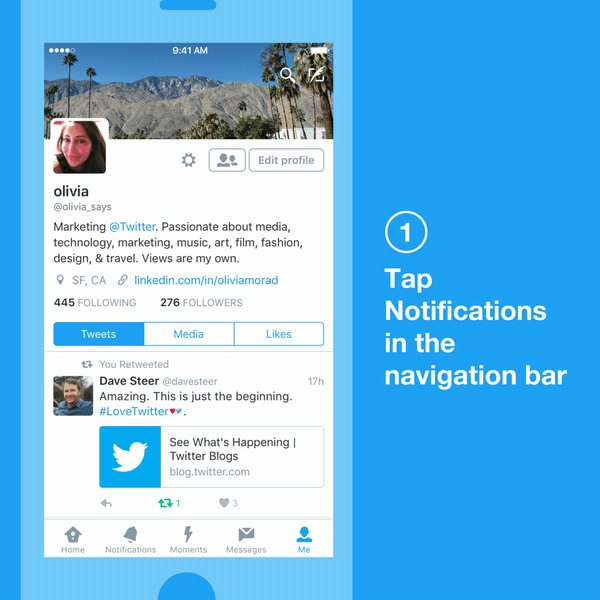
Content from accounts users follow and any recent interactions with accounts they dont, arent affected by the filter, according to Twitter.
To turn the Quality Filter on or off in the iOS app, users can tap Notifications in the navigation bar, tap the Settings icon at the top left of the screen, and toggle the associated feature switch.
A second option on the screen ensures users only see tweets from people they follow.
Available link for download
Thursday, March 30, 2017
Best Android Applications added recently to google play
Best Android Applications added recently to google play
Best Android Applications added recently to google play Best Android Applications added recently to google play Best Android Applications added recently to google play


FEATURES:
It copies the first demo version for 30 days and the second driven
Price for a cheap keyboard only 99 cents
Supports 60 languages ??and 20 different tone
Supports input by voice
Supports tablet devices
Can reduce and enlarge the keyboard
Keyboard Distinctive and old, have become available on the play google for some time after the company changed its policy and became the keyboard can be purchased by people after it was sold to phone companies to install the application on mobile phones and selling.
Download Swype Demo version for 30 days from play google

FEATURES:
Free application
Easy to use
You can find out where your device (it helps in the case of loss)
You can transfer files to Device without linking it to the USB cable
From which you can send SMS messages
Senior application of it today issued a new version where users can now transfer files between your computer and Android device without that be are connected to the same network, after that it should be are connected to the same network, the company gives users 100 megabytes per month and can be paid an additional amount to increase space.
Download AirDroid 2 of play google

FEATURES:
There are his first two copies free and the second paid
Best English Dictionary
Rating 4.6 / 5 in the PlayStation market
About two million words and defined
Meanings of medical terminology, economic and other
Supports the search for words by pronunciation
For each of the important application knows English and wants to learn English meaning of the word in English, as you know the meaning of difficult terms such as medical terminology, economic and others.
Download Dictionary.com version application Free from play google

FEATURES:
Free application
Rating of 4.2 in the PlayStation market
Photos nature
HD
The application contains dozens of live images
Beautiful application for those who want a natural backgrounds and live his machine, contains many of the live images and high accuracy, you can put images in your tablet.
Download the application for free from play google

Application for making beautiful vibrations to your phone.
FEATURES:
There are his first two copies free and the second paid
Supports making applications and vibrations Watts father and Viper, Gmail, Facebook and Twitter
Easy to use
You can make a vibration per person
A useful application for those who are putting their phones in silent mode for a long time, where you can create vibrations for callers to know whos calling without to see the phone screen, the application is easy to use and supports many applications for a particular vibration mode.
Download the free version of Vybe play google

Game install beautiful and distinctive.
FEATURES:
Free game
Make you feel comfortable
Ease of understanding of the game
You need to focus
Got a rating of 4.6 in the market play google Store
Game beautiful and quiet advised before sleep, is one of the best games in the Android system installation, the game worth the experience.
Download game Puzzle Retreat of play google
Best Android Applications Added Recently to Google Play
Best Android applications is containing the best new applications and games that have appeared recently in Google Play shop, as well as containing a number of distinctive features, and applications began to spread.1 - Swype
To-face distinct keys for Android devices.FEATURES:
It copies the first demo version for 30 days and the second driven
Price for a cheap keyboard only 99 cents
Supports 60 languages ??and 20 different tone
Supports input by voice
Supports tablet devices
Can reduce and enlarge the keyboard
Keyboard Distinctive and old, have become available on the play google for some time after the company changed its policy and became the keyboard can be purchased by people after it was sold to phone companies to install the application on mobile phones and selling.
Download Swype Demo version for 30 days from play google
2 - AirDroid
Application to control your Android devices from your browser.FEATURES:
Free application
Easy to use
You can find out where your device (it helps in the case of loss)
You can transfer files to Device without linking it to the USB cable
From which you can send SMS messages
Senior application of it today issued a new version where users can now transfer files between your computer and Android device without that be are connected to the same network, after that it should be are connected to the same network, the company gives users 100 megabytes per month and can be paid an additional amount to increase space.
Download AirDroid 2 of play google
3 - Dictionary.com
Best English Dictionary for Android devices.FEATURES:
There are his first two copies free and the second paid
Best English Dictionary
Rating 4.6 / 5 in the PlayStation market
About two million words and defined
Meanings of medical terminology, economic and other
Supports the search for words by pronunciation
For each of the important application knows English and wants to learn English meaning of the word in English, as you know the meaning of difficult terms such as medical terminology, economic and others.
Download Dictionary.com version application Free from play google
4 - Nature daydream live wallpaper
Live wallpapers for your Android device.FEATURES:
Free application
Rating of 4.2 in the PlayStation market
Photos nature
HD
The application contains dozens of live images
Beautiful application for those who want a natural backgrounds and live his machine, contains many of the live images and high accuracy, you can put images in your tablet.
Download the application for free from play google
5 - Vybe - Custom Vibrations
Application for making beautiful vibrations to your phone.
FEATURES:
There are his first two copies free and the second paid
Supports making applications and vibrations Watts father and Viper, Gmail, Facebook and Twitter
Easy to use
You can make a vibration per person
A useful application for those who are putting their phones in silent mode for a long time, where you can create vibrations for callers to know whos calling without to see the phone screen, the application is easy to use and supports many applications for a particular vibration mode.
Download the free version of Vybe play google
6- Puzzle Retreat
Game install beautiful and distinctive.
FEATURES:
Free game
Make you feel comfortable
Ease of understanding of the game
You need to focus
Got a rating of 4.6 in the market play google Store
Game beautiful and quiet advised before sleep, is one of the best games in the Android system installation, the game worth the experience.
Download game Puzzle Retreat of play google
Available link for download
Tuesday, March 28, 2017
How To Downgrade From Windows 10 To Windows 8 1
How To Downgrade From Windows 10 To Windows 8 1
Since Microsoft has launched Windows 10 on 29th July 2015, it has reached over 55 million users. Windows 10 has launched with great features that people loves and it also improves the shortcomings from Windows 8.x. Windows 10 is a free upgrade for Windows 8 and Windows 8.1 users.
Also Read: How To Download Windows 10 Right Now In Your PC?
Since Windows 10 has launched, many people has reported various problems like apps not opening, upgrade problems, network issues, automatic update problems and a lot more. But it is overall better than previous versions of Windows.
Some people decided to downgrade to their previous versions of Windows due to the above listed issues. If you are using Windows 10 on you PC, facing the same issues and would like downgrade to Windows 8.1 then you can follow the given steps. There are number of ways to roll back to Windows 8.1. We will discuss those methods one by one.
You can use this method to downgrade from Windows 10 to Windows 8.1 by creating a backup of your files or just by making a copy of your files to external hard disk. Note that, you will need to re-install your apps after rolling back to Windows 8.1
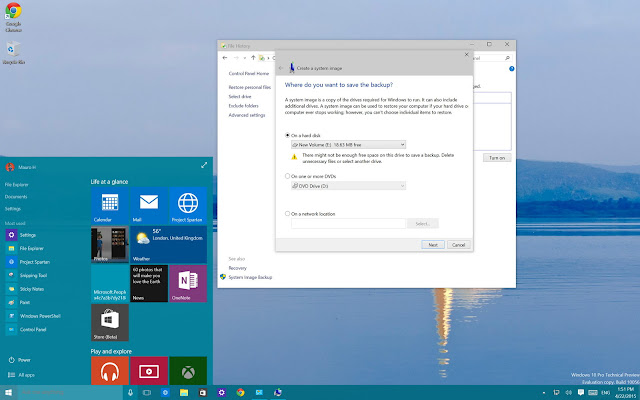
• First of all go to "Control Panel".
• Now navigate to "Programs and Features".
• Now arrange the list of apps in your system by "Installed On".
After creating backup of your files, you are ready to downgrade your Windows 10 to Windows 8.1. Keep your Windows 8.1 recovery disc ready and reboot your system. If you are not having Windows 8.1 recovery disc, you can create a Windows 8.1 recovery disc.
• In the Setup Wizard, click "Next" and then "Repair your computer".
• After that click on "Troubleshoot" > "Advanced Options" > "System Image recovery".
• Now select the operating system you want to recover from, click "Next" and then "Finish" and your recovery process will begin.
After the processing will be done, you will be back to the previous version of Windows ( Windows 8.1 ).
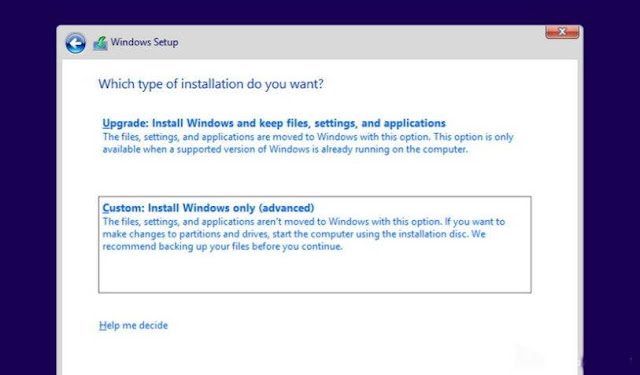
In this method rolling back, you will get a clean installation of Windows 8.1 and it requires a backup of your files and re-install all the programs. It is the cleanest way to downgrade to previous version of Windows, but it requires more time.
If you dont have installation media of Windows 8.1, then you can go to their official website as Microsoft allows you to download the files directly from companys servers. Go to their official website to create installation media and follow the instructions. Go here.
• Reboot your computer with Windows 8.1 installation media files
• Now you will see Windows setup, click "Next", after that accept the licensing and click on "Next"
• After that click on "Custom: Install Windows only (Advanced)". ( this option is selected to crate a clean installation of Windows 8.1 ).
• Now select any empty disk drive and click on "Next" to start installation.
After the installation process completes, you will get a fresh and clean copy of Windows 8.1 on you computer. now you can restore your files from backup.
Also Read: How To Download Windows 10 Right Now In Your PC?
Since Windows 10 has launched, many people has reported various problems like apps not opening, upgrade problems, network issues, automatic update problems and a lot more. But it is overall better than previous versions of Windows.
Some people decided to downgrade to their previous versions of Windows due to the above listed issues. If you are using Windows 10 on you PC, facing the same issues and would like downgrade to Windows 8.1 then you can follow the given steps. There are number of ways to roll back to Windows 8.1. We will discuss those methods one by one.
Method-1: How To Downgrade From Windows 10 To Windows 8.1 By Using Previous Backup?
You can use this method to downgrade from Windows 10 to Windows 8.1 by creating a backup of your files or just by making a copy of your files to external hard disk. Note that, you will need to re-install your apps after rolling back to Windows 8.1
How to make backup of files in Windows 10?
• First of all go to "Control Panel".
• Now navigate to "Programs and Features".
• Now arrange the list of apps in your system by "Installed On".
After creating backup of your files, you are ready to downgrade your Windows 10 to Windows 8.1. Keep your Windows 8.1 recovery disc ready and reboot your system. If you are not having Windows 8.1 recovery disc, you can create a Windows 8.1 recovery disc.
After rebooting, follow the below steps:
• In the Setup Wizard, click "Next" and then "Repair your computer".
• After that click on "Troubleshoot" > "Advanced Options" > "System Image recovery".
• Now select the operating system you want to recover from, click "Next" and then "Finish" and your recovery process will begin.
After the processing will be done, you will be back to the previous version of Windows ( Windows 8.1 ).
Method-2: How To Downgrade From Windows 10 To Windows 8.1 Using Clean Installation?
In this method rolling back, you will get a clean installation of Windows 8.1 and it requires a backup of your files and re-install all the programs. It is the cleanest way to downgrade to previous version of Windows, but it requires more time.
If you dont have installation media of Windows 8.1, then you can go to their official website as Microsoft allows you to download the files directly from companys servers. Go to their official website to create installation media and follow the instructions. Go here.
• Reboot your computer with Windows 8.1 installation media files
• Now you will see Windows setup, click "Next", after that accept the licensing and click on "Next"
• After that click on "Custom: Install Windows only (Advanced)". ( this option is selected to crate a clean installation of Windows 8.1 ).
• Now select any empty disk drive and click on "Next" to start installation.
After the installation process completes, you will get a fresh and clean copy of Windows 8.1 on you computer. now you can restore your files from backup.
Available link for download
Monday, March 27, 2017
Pastor sleeps with and attempts to use prophetess for rituals
Pastor sleeps with and attempts to use prophetess for rituals
BISMILLAHI..
A clergy man identified as Uchenna Joseph has been nabbed by officers of the Ilisan Remo police division over reports that he tried to use his prophetess wife for ritual purposes. Vanguard reports that the woman, Patience Ohelimo, from Abakaliki in Ebonyi state, accused Pastor Joseph of conniving with some unknown persons to torture, gang-rape and attempt to sacrifice her for ritual purpose. The woman who is presently being rehabilitated at a private clinic in Ogun state said the incident took place in Port Harcourt, the Rivers state capital where she had gone from her Ikorodu abode after agreeing to marry the man.
 “I was a petty trader in Ikorodu town in Lagos before my plans to get married, while my husband was a full time pastor.
In the course of our relationship, I expended all my earnings but this was not in vain as I gave birth to a boy in February 2016. “Three months after, my husband suggested we should visit his friend in Port Harcourt to raise fund for my business. So we left our base in Ogun State and during our three months stay, I became a prophetess and also assisted in evangelism, but on one fateful day, my husband conspired with his friends to sacrifice me for ritual purposes. “My refusal earned me incarceration as they tortured and gang-raped me. This took place for a number of days until I reached my sister through a text message and she came to my rescue. “They separated me from my son and were about tying me to the ceiling fan when my sister arrived the one-room church. My wedding gown and other items were kept for two years as he is yet to complete the dowry.
READ ALSO http://pinkberrylicious.blogspot.com /">http://pinkberrylicious.blogspot.com /2016/10/enjoy-multiple-advance-up-to-your.html">ADVANCE MTN EXTRA CREDIT
“I have spent all my earnings on this marriage which has almost cost me my life and I will never return to that home,” Mrs Joseph was quoted to have said. While denying the allegations by his wife, the clergyman stated that she has been psychologically unwell since they relocated to Rivers state. He explained that, “She used to see visions and loved evangelism but one day, she was on evangelism field with my friend’s relative when she was spiritually attacked and she started exhibiting strange behaviour. “But my mistake was that I did not inform her parents believing it was a minor issue until she became violent and we had to seek spiritual help by inviting some pastors to conduct deliverance for her. “She however sent a message to her elder sister and I was misunderstood. The scars on her body were as a result of the violent situation she found herself. “How can I connive with others to kill the mother of my baby? Her family was just being harsh on me for failure to complete the dowry because out of N100,000, I only paid N40,000.” Although he was initially arrested, he has been granted bail while the police officers continue with their investigations into the matter.
The Ogun state police command says it has apprehended Wole and his friend for being in possession of human parts. Vanguard reports that the duo were arrested at Ijebu, Idi-aro area of Abeokuta while policemen attached to Oke Itoku Division, led by the DPO, CSP Abeni Farinre, were on patrol. The Police Public Relations in the state, Abimbola Oyeyemi, in a statement, said the suspects took to their heels with a leather bag on sighting policemen and they were hotly chased and arrested.
A clergy man identified as Uchenna Joseph has been nabbed by officers of the Ilisan Remo police division over reports that he tried to use his prophetess wife for ritual purposes. Vanguard reports that the woman, Patience Ohelimo, from Abakaliki in Ebonyi state, accused Pastor Joseph of conniving with some unknown persons to torture, gang-rape and attempt to sacrifice her for ritual purpose. The woman who is presently being rehabilitated at a private clinic in Ogun state said the incident took place in Port Harcourt, the Rivers state capital where she had gone from her Ikorodu abode after agreeing to marry the man.
In the course of our relationship, I expended all my earnings but this was not in vain as I gave birth to a boy in February 2016. “Three months after, my husband suggested we should visit his friend in Port Harcourt to raise fund for my business. So we left our base in Ogun State and during our three months stay, I became a prophetess and also assisted in evangelism, but on one fateful day, my husband conspired with his friends to sacrifice me for ritual purposes. “My refusal earned me incarceration as they tortured and gang-raped me. This took place for a number of days until I reached my sister through a text message and she came to my rescue. “They separated me from my son and were about tying me to the ceiling fan when my sister arrived the one-room church. My wedding gown and other items were kept for two years as he is yet to complete the dowry.
READ ALSO http://pinkberrylicious.blogspot.com /">http://pinkberrylicious.blogspot.com /2016/10/enjoy-multiple-advance-up-to-your.html">ADVANCE MTN EXTRA CREDIT
“I have spent all my earnings on this marriage which has almost cost me my life and I will never return to that home,” Mrs Joseph was quoted to have said. While denying the allegations by his wife, the clergyman stated that she has been psychologically unwell since they relocated to Rivers state. He explained that, “She used to see visions and loved evangelism but one day, she was on evangelism field with my friend’s relative when she was spiritually attacked and she started exhibiting strange behaviour. “But my mistake was that I did not inform her parents believing it was a minor issue until she became violent and we had to seek spiritual help by inviting some pastors to conduct deliverance for her. “She however sent a message to her elder sister and I was misunderstood. The scars on her body were as a result of the violent situation she found herself. “How can I connive with others to kill the mother of my baby? Her family was just being harsh on me for failure to complete the dowry because out of N100,000, I only paid N40,000.” Although he was initially arrested, he has been granted bail while the police officers continue with their investigations into the matter.
The Ogun state police command says it has apprehended Wole and his friend for being in possession of human parts. Vanguard reports that the duo were arrested at Ijebu, Idi-aro area of Abeokuta while policemen attached to Oke Itoku Division, led by the DPO, CSP Abeni Farinre, were on patrol. The Police Public Relations in the state, Abimbola Oyeyemi, in a statement, said the suspects took to their heels with a leather bag on sighting policemen and they were hotly chased and arrested.
A clergy man identified as Uchenna Joseph has been nabbed by officers of the Ilisan Remo police division over reports that he tried to use his prophetess wife for ritual purposes.
Read more: https://www.naij.com/1000381-end-time-pastor-sleeps-attempts-use-prophetess-rituals-photo.html
Read more: https://www.naij.com/1000381-end-time-pastor-sleeps-attempts-use-prophetess-rituals-photo.html
A clergy man identified as Uchenna Joseph has been nabbed by officers of the Ilisan Remo police division over reports that he tried to use his prophetess wife for ritual purposes. Vanguard reports that the woman, Patience Ohelimo, from Abakaliki in Ebonyi state, accused Pastor Joseph of conniving with some unknown persons to torture, gang-rape and attempt to sacrifice her for ritual purpose. The woman who is presently being rehabilitated at a private clinic in Ogun state said the incident took place in Port Harcourt, the Rivers state capital where she had gone from her Ikorodu abode after agreeing to marry the man.
Read more: https://www.naij.com/1000381-end-time-pastor-sleeps-attempts-use-prophetess-rituals-photo.html
Read more: https://www.naij.com/1000381-end-time-pastor-sleeps-attempts-use-prophetess-rituals-photo.html
A clergy man identified as Uchenna Joseph has been nabbed by officers of the Ilisan Remo police division over reports that he tried to use his prophetess wife for ritual purposes. Vanguard reports that the woman, Patience Ohelimo, from Abakaliki in Ebonyi state, accused Pastor Joseph of conniving with some unknown persons to torture, gang-rape and attempt to sacrifice her for ritual purpose. The woman who is presently being rehabilitated at a private clinic in Ogun state said the incident took place in Port Harcourt, the Rivers state capital where she had gone from her Ikorodu abode after agreeing to marry the man.
Read more: https://www.naij.com/1000381-end-time-pastor-sleeps-attempts-use-prophetess-rituals-photo.html
Read more: https://www.naij.com/1000381-end-time-pastor-sleeps-attempts-use-prophetess-rituals-photo.html
Available link for download
CAMERA HOW TO USE MANUAL MODE APERTURE SETTING SPEED ISO
CAMERA HOW TO USE MANUAL MODE APERTURE SETTING SPEED ISO
Most Android smartphones now offer a manual (or pro) mode for the camera. It allows you to take control of more settings than the automatic mode and, under certain circumstances, to make more beautiful photos since it is you who configure all the parameters of the shooting. And the good news is that you do not need to have monstrous knowledge to master it.

Why use manual mode?
Most users still content with the automatic mode to take pictures with their smartphone . All the parameters are already preset according to the conditions of ambient brightness and most of the time, it does the trick. But since our Android smartphones have become camera phones , the sensors found on the back are not just there to make the deal, they can also help us achieve great pictures. You still have to know how to use them.
By switching to the manual mode, you will then take control of all the settings authorized by your manufacturer (we will return to this point later) and you control all the parameters of your image, which allows you to exceed the limits Of the automatic mode.

Control the exposure yourself
Before triggering the shooting, the photo sensor on your smartphone will first calculate the ambient brightness. From there, it will decide whether to trigger the flash (if it is set to automatic mode) but will also decide to lower or increase the brightness of your shot. In automatic mode, most smartphones still tend to overexpose photos.
In low light, it can help get a better result but in full sun, it sometimes gives the effect of a burned photo or whites appear too white. It is therefore best to regulate the exhibition yourself.On the latest Samsung Galaxy, its very easy to do, just slide your finger up or down, on other smartphones, it will open a small menu and select + or -.
Attention to flash
As on a "real" camera, the flash that is found on our smartphones is very convenient since it allows to bring additional light on the photos taken in low light. Most of the time, it is set to automatic mode and therefore triggers only when the sensor decides that the brightness is too low. By night, it remains essential but, it can happen that your smartphone triggers it also in daylight, especially indoors.
In these conditions, as much, it can prove useful, as much it can literally spoil your photo by generating too much exposure and producing colors that will lack natural. If you have any doubt, the best is still to try with and without. But you will see that most of the time, the photo without flash will be the most successful.
ISO sensitivity, do not overdo it!
Most Android smartphones now offer an excellent ISO sensitivity. But again, in automatic mode, the sensor tends to overestimate the needs of your photo, sometimes opting for an ISO sensitivity too strong. However, in an enlightened environment, it is not necessary to climb above 200 ISO, a value from which noise is likely to appear on the photographs, making them less sharp.
If you really have a good light, the best is still to go down to 50 ISO, if your smartphone allows it, if not 100 ISO, your picture will only be sharper.
Choose the right white balance
The white balance (indicated by WB) is calculated automatically by your smartphone. Based on ambient light, the sensor adjusts the colors of the photo to make it as close as possible to reality, but again, depending on the lighting conditions, the sensor has its limits. Fortunately, it is possible to set it manually.
This setting can sometimes seem complex in that it is to be redone every time the light conditions vary but it can nevertheless change everything to the final result.
The shutter speed
More and more smartphones now allow manual controls of the Google Camera2 API, you can adjust the shutter speed, in other words, the period of time during which the shutter will let light into the sensor . As you can see, on the photos taken in full sun, this time is very short and at night it is longer since the light needs more time to cross the sensor.

Available link for download
Read more »
Sunday, March 26, 2017
How to memory hack Mini Militia Doodle Army 2 Android one of the most popular games nowadays
How to memory hack Mini Militia Doodle Army 2 Android one of the most popular games nowadays
How to memory hack Mini Militia - Doodle Army 2(Android), one of the most popular games nowadays

Introduction
Doodle Army 2 : Mini Militia Experience intense multiplayer combat with up to 4 players online or locally in Multiplayer mode. Train with the Sarge and sharpen your skills in offline Training and Survival modes. You too can enjoy the thrills of spewing hot lead and making swiss cheese of your opponents! Hear the whiz of bullets flying past your face as you tumble for cover. Out smart the enemy with a well placed grenade and watch them explode into bloody confetti. What? Your still not satisfied? Ok then finish it of by repeatedly squatting on your opponents remains and wildly firing into the air. Victory is yours, its all waiting for you! Just press the buy button! DA2 was created based on player feedback and suggestions. Features: -Online Multiplayer via Game Center -Local Multiplayer via Bluetooth or Wifi -intuitive Dual Stick shooting controls -Open world maps -Rocket boots for extended vertical movement -Dual wield with hand guns -Zoom control on various weapons -Melee attacks Weapons:DESERT EAGLE, UZI, MAGNUM, MP5, AK47, M4, M14, SHOTGUN, M93BA, SMAW, MACHETE, PHASR, FLAMETHROWER GRENADES Powerups: POWER BOOST, HEALTH PACK Purchase the Pro Player Pack to get full access to weapons during online play.
Requirements
- Unfortunately this trick only works on Rooted phones(PREFER KINGO ROOT)
- Game Killer(Click here to download GAME KILLER)
- Well the game itself(Mini Militia) - You can get it on PlayStore.
How to alter the live RAM memory of the game while its being running
A video could be better than a series of screenshots explaining things.But I take consider of my fellow visitors with poor or low speed internet connection.Here we go :)Note - This trick will help you get enormous amount of bullets or Ammo for your guns or Grenades, etc. - Open the game Mini Militia in your phone and start the game play.
- Now minimize the game and open the app Game Killer and get back to the game.You will see a small key like icon on your screen.That is the shortcut to open the Game Killer app while you are still playing the game.
- Lets start with any weapon that is in your hand.Now note the number of bullets or ammo that left in your current gun by looking at the screen as shown below.
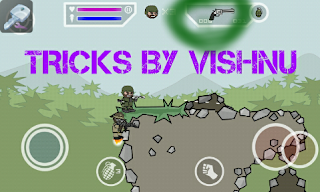
- Click on the Game killer Icon and enter the value that u got in the previous step.In my game it is "006" and press Search Button.
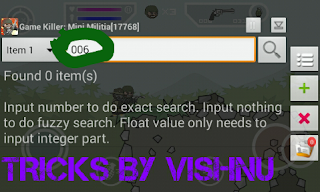
- Now in the Select Data Type list, select "WORD(0-65535)".
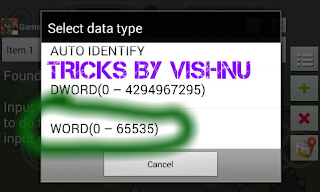
- Now it will show the list of memory location which contains the value "006". If it finds a lots of memory location with that value, then it will just show How much items it found in the previous search.
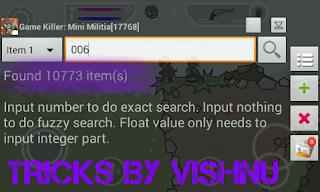
- Now minimize the Game Killer app and get in game and shoot your weapon randomly, so that your Ammo will get reduced from the previous value.In my case, I have shot once and got "005" bullets left.Note the changed ammo value.
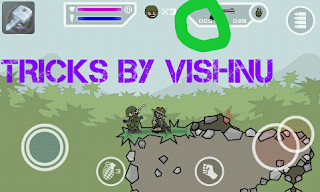
- Get back to Game Killer and enter the value.For me its "005" and press Search.Now it will show a small list of memory location with value you have searched for.
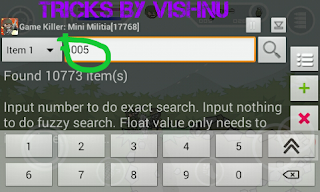
- We still have to find the exact memory location, so that we can alter the value of the memory location to change the number of bullets or ammo.Now minimize Game Killer and shoot once again in game, so that the value will reduce from the previous ammo left.Now for me the value changed to "004". Now get back to Game Killer and scroll the list and search for the list with value "The ammo left in game" which has changed from the previous ammo left.For me changed from "5" to "4".
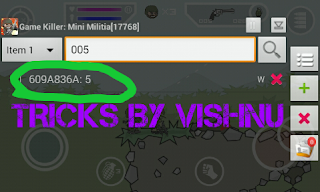
- Hurray we have found the exact location of the bullets or ammo stored in the memory.Now click on that memory location and change it to your desired value and press OK.
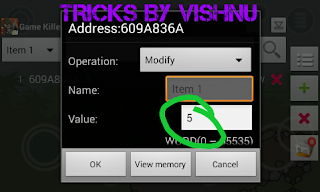
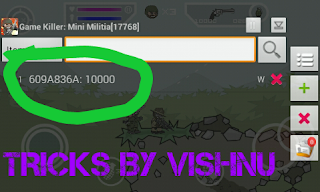
- Now there is a surprise left for you, when you come back to game.You will come to see that the number of bullets is the number that you have entered in the Game Killer. Woah!!!!!!!!
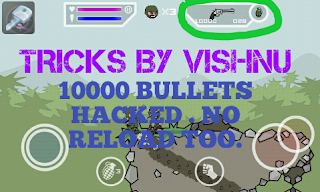
By following the same steps above, you can hack any weapon or grenades in Mini Militia or any games.Just get experienced to the above guide, you will be automated.
NEW UPDATE :
NEW UPDATE :
MINI MILITIA MODS FOR NON ROOTED USERS
I WILL BE PUBLISHING MORE HACKS WITH GAME KILLER SOON .....................................
Available link for download
Subscribe to:
Posts (Atom)