Showing posts with label pixel. Show all posts
Showing posts with label pixel. Show all posts
Wednesday, February 22, 2017
GOOGLE PIXEL FACED WITH THE MANY BUGS GOOGLE ADVISES TO GO SEE ELSEWHERE
GOOGLE PIXEL FACED WITH THE MANY BUGS GOOGLE ADVISES TO GO SEE ELSEWHERE
Google seems to be in a mess with its Pixel and Pixel XL. While many bugs come to tarnish the beginnings of its home smartphones, the firm of Mountain View seems deprived. She has just confessed to the famous bug of sound distortion.As the only solution, the company advised ... to go elsewhere.

While a new bug that blocks Google Pixel has been echoed by some users, Google seems completely helpless against the multiple problems facing his first house smartphones.
Remember, there are some time now, users of Google Pixel Pixel XL and complained about his problems . To make it simple, they observed a distortion of sound when the volume began to climb. Moreover, it is the most expensive models, the Pixel XL which were mainly affected.
Since then, Google has offered its customers to replace their model and started looking for where the concern was. But today we learn that the firm seems to have given up. This is in any case what a user tells us who wanted to participate in solving the problem.
Owner of a Pixel XL, he communicated to Google all the details of his research and the results of his tests in order to find solutions. It is important to note that this user was already in his third exchange (his fourth model therefore). But goodwill and especially fan of this smartphone, so he wanted to help.
But when he received the email from Google following sending his findings, he had a barely credible surprise. Google simply advised him to go elsewhere. The firm invited him to turn to another brand, pledging to reimburse him his Google Pixel XL.
The US giant has even explained that he was not sure how to solve this problem. A confession of failure that does not really resemble the firm. The user in question is not ready for the moment to change dairy and requested a new exchange.
But in terms of image, for Google, the damage is done. Advisor to go see the competition when we face this type of problem, it is rather average. Was Google really ready to enter the smartphone market?
Available link for download

Wednesday, January 25, 2017
Cara Mudah Reset Ponsel Google Pixel
Cara Mudah Reset Ponsel Google Pixel
Kompdroid - Dalam posting berikut ini, saya akan memberitahu Anda bagaimana untuk Atur Google Pixel menggunakan metode yang berbeda. Google Pixel adalah andalan terbaru dari Tek Gaint, meskipun tidak mendapatkan respon seperti sebelumnya perangkat Google Nexus punya. Tapi tetap, Google Pixel tidak diragukan lagi perangkat yang baik untuk memiliki, karena ada banyak pengguna baru yang telah beralih ke Google Pixel dan namun mereka tidak tahu Atur Google Pixel, berikut ini adalah metode utama dan dasar untuk hard reset atau lembut Google pixel.
Mari kita mulai dengan soft reset yang membantu Anda memperbaiki perangkat beku Anda. Yang harus Anda lakukan adalah Tekan dan Tahan tombol Power selama 15 detik. Setelah perangkat Anda dimatikan, hidupkan menggunakan tombol yang sama.
Download Google Pixel Wallpaper App untuk Android [Wallpaper APK]
Unduh Google Pixel Apps (Pixel Launcher, Wallpaper Picker dan More)
Unduh Google Pixel Apps (Pixel Launcher, Wallpaper Picker dan More)
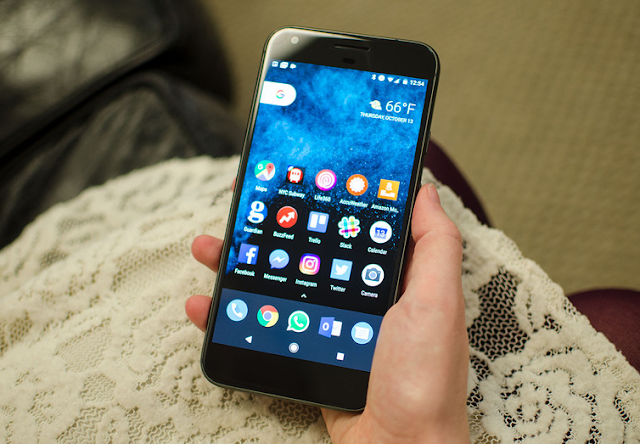 |
| Reset google pixel |
Cara Reset Google Pixel:
Mari kita mulai dengan soft reset yang membantu Anda memperbaiki perangkat beku Anda. Yang harus Anda lakukan adalah Tekan dan Tahan tombol Power selama 15 detik. Setelah perangkat Anda dimatikan, hidupkan menggunakan tombol yang sama.
Hard Reset:
Metode pertama Anda dapat menggunakan ini dalam pengaturan devcie Anda. ("Pengaturan"> "Backup & reset"> "pabrik"> "RESET PHONE".)
Metode # 2:
- Matikan perangkat Anda.
- Sekarang tekan dan tahan rumah + Power + Volume Naik.
- Lepaskan tombol power setelah Anda melihat logo Perangkat, namun tetap memegang rumah dan Volume up kunci.
- Sekarang ketika Anda melihat logo Android, melepaskan kedua tombol.
- Gunakan volume bawah tombol untuk menavigasi dan sorot menghapus ulang data / pabrik.
- Sekarang gunakan tombol daya untuk memilih opsi.
- Anda harus memilih Ya ketika Anda akan diminta untuk menu berikutnya.
- Sekarang menunggu proses akan selesai, setelah itu dilakukan sistem Reboot sekarang sorot dan tombol power tekan untuk memilihnya.
- selesai.
Available link for download
Subscribe to:
Posts (Atom)