Showing posts with label from. Show all posts
Showing posts with label from. Show all posts
Tuesday, March 28, 2017
How To Downgrade From Windows 10 To Windows 8 1
How To Downgrade From Windows 10 To Windows 8 1
Since Microsoft has launched Windows 10 on 29th July 2015, it has reached over 55 million users. Windows 10 has launched with great features that people loves and it also improves the shortcomings from Windows 8.x. Windows 10 is a free upgrade for Windows 8 and Windows 8.1 users.
Also Read: How To Download Windows 10 Right Now In Your PC?
Since Windows 10 has launched, many people has reported various problems like apps not opening, upgrade problems, network issues, automatic update problems and a lot more. But it is overall better than previous versions of Windows.
Some people decided to downgrade to their previous versions of Windows due to the above listed issues. If you are using Windows 10 on you PC, facing the same issues and would like downgrade to Windows 8.1 then you can follow the given steps. There are number of ways to roll back to Windows 8.1. We will discuss those methods one by one.
You can use this method to downgrade from Windows 10 to Windows 8.1 by creating a backup of your files or just by making a copy of your files to external hard disk. Note that, you will need to re-install your apps after rolling back to Windows 8.1
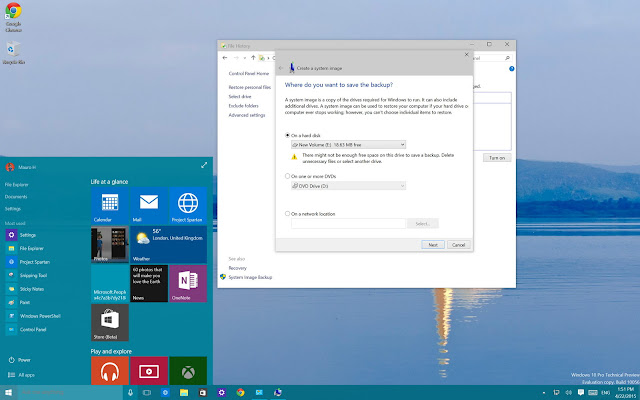
• First of all go to "Control Panel".
• Now navigate to "Programs and Features".
• Now arrange the list of apps in your system by "Installed On".
After creating backup of your files, you are ready to downgrade your Windows 10 to Windows 8.1. Keep your Windows 8.1 recovery disc ready and reboot your system. If you are not having Windows 8.1 recovery disc, you can create a Windows 8.1 recovery disc.
• In the Setup Wizard, click "Next" and then "Repair your computer".
• After that click on "Troubleshoot" > "Advanced Options" > "System Image recovery".
• Now select the operating system you want to recover from, click "Next" and then "Finish" and your recovery process will begin.
After the processing will be done, you will be back to the previous version of Windows ( Windows 8.1 ).
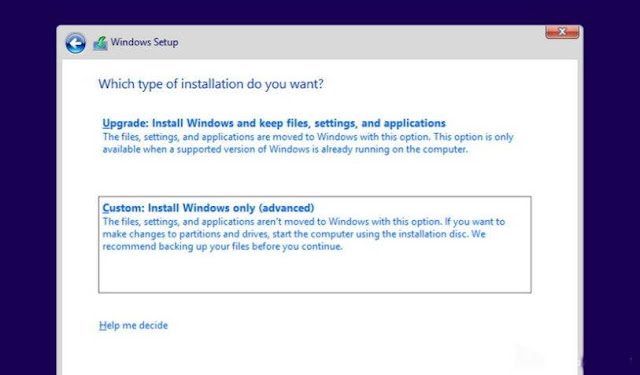
In this method rolling back, you will get a clean installation of Windows 8.1 and it requires a backup of your files and re-install all the programs. It is the cleanest way to downgrade to previous version of Windows, but it requires more time.
If you dont have installation media of Windows 8.1, then you can go to their official website as Microsoft allows you to download the files directly from companys servers. Go to their official website to create installation media and follow the instructions. Go here.
• Reboot your computer with Windows 8.1 installation media files
• Now you will see Windows setup, click "Next", after that accept the licensing and click on "Next"
• After that click on "Custom: Install Windows only (Advanced)". ( this option is selected to crate a clean installation of Windows 8.1 ).
• Now select any empty disk drive and click on "Next" to start installation.
After the installation process completes, you will get a fresh and clean copy of Windows 8.1 on you computer. now you can restore your files from backup.
Also Read: How To Download Windows 10 Right Now In Your PC?
Since Windows 10 has launched, many people has reported various problems like apps not opening, upgrade problems, network issues, automatic update problems and a lot more. But it is overall better than previous versions of Windows.
Some people decided to downgrade to their previous versions of Windows due to the above listed issues. If you are using Windows 10 on you PC, facing the same issues and would like downgrade to Windows 8.1 then you can follow the given steps. There are number of ways to roll back to Windows 8.1. We will discuss those methods one by one.
Method-1: How To Downgrade From Windows 10 To Windows 8.1 By Using Previous Backup?
You can use this method to downgrade from Windows 10 to Windows 8.1 by creating a backup of your files or just by making a copy of your files to external hard disk. Note that, you will need to re-install your apps after rolling back to Windows 8.1
How to make backup of files in Windows 10?
• First of all go to "Control Panel".
• Now navigate to "Programs and Features".
• Now arrange the list of apps in your system by "Installed On".
After creating backup of your files, you are ready to downgrade your Windows 10 to Windows 8.1. Keep your Windows 8.1 recovery disc ready and reboot your system. If you are not having Windows 8.1 recovery disc, you can create a Windows 8.1 recovery disc.
After rebooting, follow the below steps:
• In the Setup Wizard, click "Next" and then "Repair your computer".
• After that click on "Troubleshoot" > "Advanced Options" > "System Image recovery".
• Now select the operating system you want to recover from, click "Next" and then "Finish" and your recovery process will begin.
After the processing will be done, you will be back to the previous version of Windows ( Windows 8.1 ).
Method-2: How To Downgrade From Windows 10 To Windows 8.1 Using Clean Installation?
In this method rolling back, you will get a clean installation of Windows 8.1 and it requires a backup of your files and re-install all the programs. It is the cleanest way to downgrade to previous version of Windows, but it requires more time.
If you dont have installation media of Windows 8.1, then you can go to their official website as Microsoft allows you to download the files directly from companys servers. Go to their official website to create installation media and follow the instructions. Go here.
• Reboot your computer with Windows 8.1 installation media files
• Now you will see Windows setup, click "Next", after that accept the licensing and click on "Next"
• After that click on "Custom: Install Windows only (Advanced)". ( this option is selected to crate a clean installation of Windows 8.1 ).
• Now select any empty disk drive and click on "Next" to start installation.
After the installation process completes, you will get a fresh and clean copy of Windows 8.1 on you computer. now you can restore your files from backup.
Available link for download

Thursday, February 23, 2017
How To Instal Kodi From Officiel Website
How To Instal Kodi From Officiel Website
Disclaimer : please remember that streaming tv shows and movies can be against your local laws.
- How To Install Kodi ?:
Navigat To officiel Kodi Website.And Doawnlaod The Version Of Your Liking (I,E ,Windows,Mac,Os) .Click Here To Get There .
Here is a little video to help you :)
Ones kodi is installed,it is time to set up the appropriateaddons .
- How To Install Kodi ?:
Navigat To officiel Kodi Website.And Doawnlaod The Version Of Your Liking (I,E ,Windows,Mac,Os) .Click Here To Get There .
Here is a little video to help you :)
Ones kodi is installed,it is time to set up the appropriateaddons .
Available link for download
Friday, January 27, 2017
Game Dungeon Hunter 4 from Gameloft Android officially
Game Dungeon Hunter 4 from Gameloft Android officially
Game Dungeon Hunter 4 from Gameloft Android officially

Gameloft announced the launch of the game Dungeon Hunter 4 legendary officially on Android devices through the Google Play Store, where the game progresses legendary style games and fighting through the development of one of the existing characters and raise the level of your hero in phases with interesting graphics and beautiful effects.
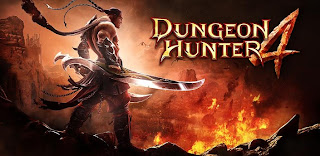
Prepared by the thrill of discovery of cells
· Progress through an epic story and amazing environments
· Admiralty of enemies and bosses
· plunder many items
.Try playing the roles of the fact
· Choose from four figures Each character has a special character in the way of fighting
· Increase your skill level in the battle
· Justice and developed each character that play out and add capabilities magic Bdlatk
· Expose unveil the mysteries warriors
.Play Style Play pluralistic
· Cooperation and enter the battlefields of very intense battles
· Show your skills in battles of style player against player PvP!

When you wake up from hibernation and nightmare, youll find your kingdom Valienthia have been destroyed.
Fascinate the world rally attack meant as extinct, this attack will cause you shock but it will not hurt you, you seem to Suffer from delusions and you will feel that you are someone else is unknown. You do not know it, but you may be hoping the last Valienthia. You fight for your people and your destiny. You struggle and movement from the wilds Valienthia to mountains Kankhir and fallow lands inhabited ghosts.
Download Game Dungeon Hunter 4 form Google Play
Available link for download
Subscribe to:
Posts (Atom)