Showing posts with label windows. Show all posts
Showing posts with label windows. Show all posts
Sunday, April 9, 2017
Instagram Arrives On Windows Desktops
Instagram Arrives On Windows Desktops
Following the launch of its app on Windows Mobile in April, Instagram has finally brought its visual social network to Windows desktops as a standalone app.
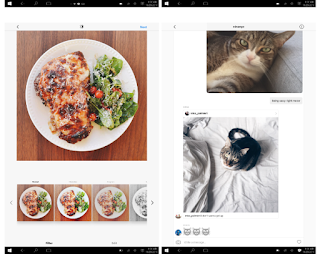
The newly launched Instagram windows app lets you browse your feed, view Stories, as well as check and send direct messages. It also offers search, the Explore tab, and access to your profile, liked posts and settings. And unlike the Web app, it also offers sharing options for Facebook and Messenger from the context menu (click the ‘…’ button to access it).
Instagram says any device running Windows 10 can use its app, which is available for download in the Windows App Store. Although, for Windows 10 devices other than tablets and smartphones, it notes certain features may not be supported — such as capturing and uploading videos or photos. The app requires a touchscreen Windows 10 device to actually upload content.
The app, which is better suited to tablets at the moment, needs a lot of work to accommodate desktop users. For one thing, the main interface only takes up the center of your screen, leaving plenty of white space on either side. That space could’ve been better utilized to display comments next to photos in your feed, similar to how the Web app shows individual posts.
Not just that the app alsocrashes when you try to add a Story, if you’re using a machine without a backward-facing camera. It’d be best to either hide this button or simply allow people to upload images and video on whatever device they have. There’s also a Live Tile which should ideally rotate images from your feed in your Start menu, but I haven’t been able to get it to work yet.
We are looking forward to see this issues fixed – and perhaps even get the ability to post from any PC, camera or not – in a future release to enable people enjoy the Instagram windows App.
The newly launched Instagram windows app lets you browse your feed, view Stories, as well as check and send direct messages. It also offers search, the Explore tab, and access to your profile, liked posts and settings. And unlike the Web app, it also offers sharing options for Facebook and Messenger from the context menu (click the ‘…’ button to access it).
Instagram says any device running Windows 10 can use its app, which is available for download in the Windows App Store. Although, for Windows 10 devices other than tablets and smartphones, it notes certain features may not be supported — such as capturing and uploading videos or photos. The app requires a touchscreen Windows 10 device to actually upload content.
The app, which is better suited to tablets at the moment, needs a lot of work to accommodate desktop users. For one thing, the main interface only takes up the center of your screen, leaving plenty of white space on either side. That space could’ve been better utilized to display comments next to photos in your feed, similar to how the Web app shows individual posts.
Not just that the app alsocrashes when you try to add a Story, if you’re using a machine without a backward-facing camera. It’d be best to either hide this button or simply allow people to upload images and video on whatever device they have. There’s also a Live Tile which should ideally rotate images from your feed in your Start menu, but I haven’t been able to get it to work yet.
We are looking forward to see this issues fixed – and perhaps even get the ability to post from any PC, camera or not – in a future release to enable people enjoy the Instagram windows App.
Available link for download

Tuesday, March 28, 2017
How To Downgrade From Windows 10 To Windows 8 1
How To Downgrade From Windows 10 To Windows 8 1
Since Microsoft has launched Windows 10 on 29th July 2015, it has reached over 55 million users. Windows 10 has launched with great features that people loves and it also improves the shortcomings from Windows 8.x. Windows 10 is a free upgrade for Windows 8 and Windows 8.1 users.
Also Read: How To Download Windows 10 Right Now In Your PC?
Since Windows 10 has launched, many people has reported various problems like apps not opening, upgrade problems, network issues, automatic update problems and a lot more. But it is overall better than previous versions of Windows.
Some people decided to downgrade to their previous versions of Windows due to the above listed issues. If you are using Windows 10 on you PC, facing the same issues and would like downgrade to Windows 8.1 then you can follow the given steps. There are number of ways to roll back to Windows 8.1. We will discuss those methods one by one.
You can use this method to downgrade from Windows 10 to Windows 8.1 by creating a backup of your files or just by making a copy of your files to external hard disk. Note that, you will need to re-install your apps after rolling back to Windows 8.1
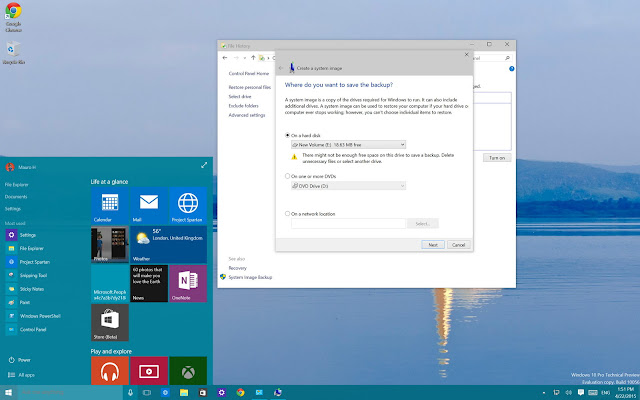
• First of all go to "Control Panel".
• Now navigate to "Programs and Features".
• Now arrange the list of apps in your system by "Installed On".
After creating backup of your files, you are ready to downgrade your Windows 10 to Windows 8.1. Keep your Windows 8.1 recovery disc ready and reboot your system. If you are not having Windows 8.1 recovery disc, you can create a Windows 8.1 recovery disc.
• In the Setup Wizard, click "Next" and then "Repair your computer".
• After that click on "Troubleshoot" > "Advanced Options" > "System Image recovery".
• Now select the operating system you want to recover from, click "Next" and then "Finish" and your recovery process will begin.
After the processing will be done, you will be back to the previous version of Windows ( Windows 8.1 ).
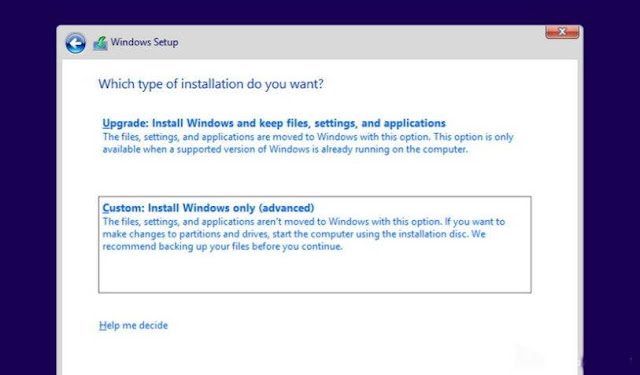
In this method rolling back, you will get a clean installation of Windows 8.1 and it requires a backup of your files and re-install all the programs. It is the cleanest way to downgrade to previous version of Windows, but it requires more time.
If you dont have installation media of Windows 8.1, then you can go to their official website as Microsoft allows you to download the files directly from companys servers. Go to their official website to create installation media and follow the instructions. Go here.
• Reboot your computer with Windows 8.1 installation media files
• Now you will see Windows setup, click "Next", after that accept the licensing and click on "Next"
• After that click on "Custom: Install Windows only (Advanced)". ( this option is selected to crate a clean installation of Windows 8.1 ).
• Now select any empty disk drive and click on "Next" to start installation.
After the installation process completes, you will get a fresh and clean copy of Windows 8.1 on you computer. now you can restore your files from backup.
Also Read: How To Download Windows 10 Right Now In Your PC?
Since Windows 10 has launched, many people has reported various problems like apps not opening, upgrade problems, network issues, automatic update problems and a lot more. But it is overall better than previous versions of Windows.
Some people decided to downgrade to their previous versions of Windows due to the above listed issues. If you are using Windows 10 on you PC, facing the same issues and would like downgrade to Windows 8.1 then you can follow the given steps. There are number of ways to roll back to Windows 8.1. We will discuss those methods one by one.
Method-1: How To Downgrade From Windows 10 To Windows 8.1 By Using Previous Backup?
You can use this method to downgrade from Windows 10 to Windows 8.1 by creating a backup of your files or just by making a copy of your files to external hard disk. Note that, you will need to re-install your apps after rolling back to Windows 8.1
How to make backup of files in Windows 10?
• First of all go to "Control Panel".
• Now navigate to "Programs and Features".
• Now arrange the list of apps in your system by "Installed On".
After creating backup of your files, you are ready to downgrade your Windows 10 to Windows 8.1. Keep your Windows 8.1 recovery disc ready and reboot your system. If you are not having Windows 8.1 recovery disc, you can create a Windows 8.1 recovery disc.
After rebooting, follow the below steps:
• In the Setup Wizard, click "Next" and then "Repair your computer".
• After that click on "Troubleshoot" > "Advanced Options" > "System Image recovery".
• Now select the operating system you want to recover from, click "Next" and then "Finish" and your recovery process will begin.
After the processing will be done, you will be back to the previous version of Windows ( Windows 8.1 ).
Method-2: How To Downgrade From Windows 10 To Windows 8.1 Using Clean Installation?
In this method rolling back, you will get a clean installation of Windows 8.1 and it requires a backup of your files and re-install all the programs. It is the cleanest way to downgrade to previous version of Windows, but it requires more time.
If you dont have installation media of Windows 8.1, then you can go to their official website as Microsoft allows you to download the files directly from companys servers. Go to their official website to create installation media and follow the instructions. Go here.
• Reboot your computer with Windows 8.1 installation media files
• Now you will see Windows setup, click "Next", after that accept the licensing and click on "Next"
• After that click on "Custom: Install Windows only (Advanced)". ( this option is selected to crate a clean installation of Windows 8.1 ).
• Now select any empty disk drive and click on "Next" to start installation.
After the installation process completes, you will get a fresh and clean copy of Windows 8.1 on you computer. now you can restore your files from backup.
Available link for download
Thursday, March 16, 2017
Download Dc Legends untuk pc windows mac
Download Dc Legends untuk pc windows mac
kompdroid - Anda dapat Mainkan DC Legends untuk PC pada Windows XP / 7/8 / 8.1 / 10 Desktop PC / Laptop dan juga Mac OS X Macbook / iMac. Bermain DC Legends untuk PC telah dimungkinkan dengan menggunakan emulator Android seperti BlueStacks, Andy, dan Remix OS. Sebelum pergi melalui petunjuk instalasi, mari kita belajar sedikit tentang permainan ini.
Kita semua ingin menjadi Superman, Batman dan lebih pahlawan liga Keadilan terkenal, kami sekarang Anda bisa karena ada permainan baru yang disebut "DC legenda" yang memberi Anda kesempatan untuk memimpin tim superhero dunia untuk menyelamatkan dunia. DC legenda permainan yang dibuat oleh Warner Bros. Enterprises International yang berarti Anda dapat memiliki semua superhero favorit Anda pada tim Anda. Anda harus menyimpan DC dari bayang-bayang nubuat Blackest Malam, Anda dapat mempelajari lebih lanjut tentang DC legenda dari Google Play. Mari kita mulai metode untuk men-download.
Download - Windows / Mac:
Kita semua ingin menjadi Superman, Batman dan lebih pahlawan liga Keadilan terkenal, kami sekarang Anda bisa karena ada permainan baru yang disebut "DC legenda" yang memberi Anda kesempatan untuk memimpin tim superhero dunia untuk menyelamatkan dunia. DC legenda permainan yang dibuat oleh Warner Bros. Enterprises International yang berarti Anda dapat memiliki semua superhero favorit Anda pada tim Anda. Anda harus menyimpan DC dari bayang-bayang nubuat Blackest Malam, Anda dapat mempelajari lebih lanjut tentang DC legenda dari Google Play. Mari kita mulai metode untuk men-download.
 |
| dc legend untuk pc |
Download - Windows / Mac:
- Donload DC Legends APK.
- Download dan install Bluestacks: Bluestacks Offline Installer | Bluestacks rooted | Bluestacks App Player
- Setelah Anda menginstal Bluestacks, klik dua kali APK yang baru saja Anda download di atas.
- APK akan dipasang menggunakan Bluestacks, setelah diinstal buka Bluestacks dan menemukan DC Legends baru-baru diinstal.
- Klik ikon DC Legends untuk membukanya, ikuti petunjuk pada layar untuk memainkannya.
Available link for download
Friday, March 10, 2017
WIFI WPS WPA Tester untuk PC Download Windows Mac
WIFI WPS WPA Tester untuk PC Download Windows Mac
Kompdroid - WIFI WPS WPA Tester untuk PC sekarang tersedia dan dapat dengan mudah diinstal pada PC desktop / Laptop menjalankan Windows XP / 7/8 / 8.1 / 10 dan MacOS / OS X. Mari kita belajar sedikit tentang ini semua aplikasi baru dan kemudian memiliki terlihat pada metode instalasi melalui BlueStacks atau BlueStacks 2.

Saat ini, setiap orang memiliki lebih dari 1 koneksi internet di rumah mereka dan karena kami tidak memeriksa semuanya teratur ada kemungkinan bahwa titik akses kami adalah rentan di protokol WPS. Sekarang Anda semua akan berpikir bagaimana untuk melakukannya? , Anda tidak perlu melakukan apa-apa yang Anda butuhkan adalah WIFI WPS WPA Tester dan aplikasi ini akan melakukan segalanya untuk memeriksa bahwa jika titik akses Anda rentan pada protokol WPS atau tidak. Dalam posting berikut ini, saya akan memberitahu Anda bagaimana Anda dapat men-download dan menginstal WIFI WPS WPA Tester untuk PC. Mari kita mulai proses.
Download WIFI WPS WPA Tester untuk PC
Metode: 2
Saat ini, setiap orang memiliki lebih dari 1 koneksi internet di rumah mereka dan karena kami tidak memeriksa semuanya teratur ada kemungkinan bahwa titik akses kami adalah rentan di protokol WPS. Sekarang Anda semua akan berpikir bagaimana untuk melakukannya? , Anda tidak perlu melakukan apa-apa yang Anda butuhkan adalah WIFI WPS WPA Tester dan aplikasi ini akan melakukan segalanya untuk memeriksa bahwa jika titik akses Anda rentan pada protokol WPS atau tidak. Dalam posting berikut ini, saya akan memberitahu Anda bagaimana Anda dapat men-download dan menginstal WIFI WPS WPA Tester untuk PC. Mari kita mulai proses.
Download WIFI WPS WPA Tester untuk PC
- Download dan menginstal BlueStacks atau Remix OS Player: Bluestacks Offline Installer | Bluestacks berakar | Bluestacks App Player | Remix OS Player untuk PC
- Buka BlueStacks dan instal atau Remix OS Player dan buka Google Play Store di dalamnya.
- Sekarang di Play Store, mencari "WIFI WPS WPA Tester".
- Install permainan dan membuka laci aplikasi atau semua aplikasi di emulator.
- Klik Portal Worlds ikon untuk membukanya, ikuti petunjuk pada layar untuk memainkannya.
Metode: 2
- Ambil WIFI WPS WPA Tester APK.
- Download dan install Bluestacks: Bluestacks Offline Installer | Bluestacks berakar | Bluestacks App Player
- Setelah Anda menginstal Bluestacks, klik dua kali APK yang baru saja Anda download di atas.
- APK akan dipasang menggunakan Bluestacks, setelah diinstal terbuka Bluestacks dan cari yang baru saja diinstal WIFI WPS WPA Tester.
- Klik ikon WIFI WPS WPA Tester untuk membukanya, ikuti petunjuk pada layar untuk memainkannya.
Available link for download
Wednesday, March 8, 2017
Battlefield 1 2016 PC Edition Pre Cracked Black Box PC Windows
Battlefield 1 2016 PC Edition Pre Cracked Black Box PC Windows
Battlefield 1 2016 PC Edition Pre-Cracked Black Box [New][Ripped]

Download Links:
- Battlefield 1 2016 Download Page
Available link for download
Tuesday, March 7, 2017
a JAYS Five new headphones to the ear phones dedicated to the ios Android and Windows Phone 2013
a JAYS Five new headphones to the ear phones dedicated to the ios Android and Windows Phone 2013
a-JAYS Five new headphones to the ear phones dedicated to the ios , Android and Windows Phone 2013
a-JAYS Five new headphones to the ear phones dedicated to the ios , Android and Windows Phone 2014

a-JAYS Five new headphones to the ear phones dedicated to the iOS , Android and Windows Phone 2013
System, the IOS is one of the mobile operating systems the most popular among users, so it is not surprising to see some manufacturers are manufacturing some accessories based on the functions and features of this system, but the good news for users of Android and Windows Phone is that if they were looking for headphones new ear design sophisticated and at the same time with high quality, let it be in the knowledge that the company is a leader in the field of acoustics Jays carrying something good for them. In fact, the latter newly detects the latest series of headphones a-JAYS Five It is available in three different versions, and it comes here with all of the issued IOS and Android in addition to the iPhone version of Windows.
Although all of these models will have the same shape and the same sound quality , they are designed for different operating systems, and with the presence of three different butto ns in these headphones , the operating system will be able to identify the possibility of reply and end calls with the ability to play music on and off , and adjust the volume : In addition to many other things. Apart from this, the headphones a - JAYS Five are available on the new design compared to its predecessor so that it became available at the edges of the circular, which is supposed to improve the comfort of the weare r. Priced at $ 100 , you will be able to get these headphones in black or white color, and will be available on the company website very soon.
Available link for download
Sunday, March 5, 2017
WinISO 6 4 1 6137 Full Version Windows Cracked Download
WinISO 6 4 1 6137 Full Version Windows Cracked Download
WinISO 6.4.1.6137 Full Version [Keygen][Windows]

WinISO 6.4.1.6137 Full Version – WinISO enables you to mount ISO, make bootable ISO images, burn CD, DVD, and Blu-ray discs. It is the world’s first ISO image software for meeting almost all disc images needs. It can not only convert BIN to ISO and other image files format conversion but also extract, edit, mount, create and burn ISO image files directly.WinISO is an application
Download Links:
- WinISO 6.4.1.6137 Full Download Page
Available link for download