Showing posts with label instagram. Show all posts
Showing posts with label instagram. Show all posts
Sunday, April 9, 2017
Instagram Arrives On Windows Desktops
Instagram Arrives On Windows Desktops
Following the launch of its app on Windows Mobile in April, Instagram has finally brought its visual social network to Windows desktops as a standalone app.
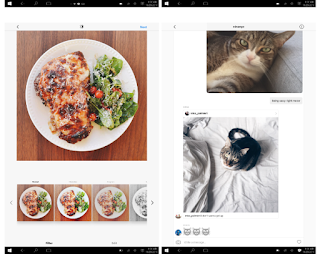
The newly launched Instagram windows app lets you browse your feed, view Stories, as well as check and send direct messages. It also offers search, the Explore tab, and access to your profile, liked posts and settings. And unlike the Web app, it also offers sharing options for Facebook and Messenger from the context menu (click the ‘…’ button to access it).
Instagram says any device running Windows 10 can use its app, which is available for download in the Windows App Store. Although, for Windows 10 devices other than tablets and smartphones, it notes certain features may not be supported — such as capturing and uploading videos or photos. The app requires a touchscreen Windows 10 device to actually upload content.
The app, which is better suited to tablets at the moment, needs a lot of work to accommodate desktop users. For one thing, the main interface only takes up the center of your screen, leaving plenty of white space on either side. That space could’ve been better utilized to display comments next to photos in your feed, similar to how the Web app shows individual posts.
Not just that the app alsocrashes when you try to add a Story, if you’re using a machine without a backward-facing camera. It’d be best to either hide this button or simply allow people to upload images and video on whatever device they have. There’s also a Live Tile which should ideally rotate images from your feed in your Start menu, but I haven’t been able to get it to work yet.
We are looking forward to see this issues fixed – and perhaps even get the ability to post from any PC, camera or not – in a future release to enable people enjoy the Instagram windows App.
The newly launched Instagram windows app lets you browse your feed, view Stories, as well as check and send direct messages. It also offers search, the Explore tab, and access to your profile, liked posts and settings. And unlike the Web app, it also offers sharing options for Facebook and Messenger from the context menu (click the ‘…’ button to access it).
Instagram says any device running Windows 10 can use its app, which is available for download in the Windows App Store. Although, for Windows 10 devices other than tablets and smartphones, it notes certain features may not be supported — such as capturing and uploading videos or photos. The app requires a touchscreen Windows 10 device to actually upload content.
The app, which is better suited to tablets at the moment, needs a lot of work to accommodate desktop users. For one thing, the main interface only takes up the center of your screen, leaving plenty of white space on either side. That space could’ve been better utilized to display comments next to photos in your feed, similar to how the Web app shows individual posts.
Not just that the app alsocrashes when you try to add a Story, if you’re using a machine without a backward-facing camera. It’d be best to either hide this button or simply allow people to upload images and video on whatever device they have. There’s also a Live Tile which should ideally rotate images from your feed in your Start menu, but I haven’t been able to get it to work yet.
We are looking forward to see this issues fixed – and perhaps even get the ability to post from any PC, camera or not – in a future release to enable people enjoy the Instagram windows App.
Available link for download

Friday, April 7, 2017
Instagram Full Apk Latest Version V7 5 2 Free Download For Android
Instagram Full Apk Latest Version V7 5 2 Free Download For Android
Instagram Full Apk Latest Version V7.5.2 Free Download For Android
This game is very powerful game for android.This instagram social APK app for android devices latest version you are download here.Instagram is the best and very simple way to share you daily life moments.You can share pictures ,videos ,etc. Click here to download.
Free Download
Available link for download
Thursday, March 30, 2017
Get Likes on Instagram APK Latest Version Free Download For Android
Get Likes on Instagram APK Latest Version Free Download For Android

Download Free Get Likes on Instagram Latest v3.2 [APK]
Get Likes on Instagram App APK is an application that, as its name suggests, will allow us to get more likes on our photos of Instagram, No gimmicks.
The procedure to get these likes is very simple. Users send the photo you want to receive likes using the currency (coins) from the application itself, so that other users of Get Likes on Instagram can see it and evaluate it. Likewise, a user will have to see and appreciate photographs of other users to continue receiving coins and can send more photos. Thanks to this procedure, users are guaranteed that your photos will receive likes more or less cleanly. Another way to get coins is to see video ads within the application itself. Now this is completely optional and can do so only if we want. The Latest version of Get Likes on Instagram APK is an interesting application for users who want to get their photographs of Instagram many users.
Clicking the following link you will have the latest version of Get Likes on Instagram APK free Download For your android.
Requires Android:
Requires Android:
- 2.3 and up
Note:
When you click the following link it will redirect you to a new page where you will see a download button, just click that button and your download will start automatically in 15 to 20 Seconds. IF it will pop up to a new tab then once again click the download button and your APK will start downloading.
Click Here To Download Free Get Likes on Instagram Latest v3.2 APK From Media Fire
Click Here To Download Free Get Likes on Instagram Latest v3.2 APK From Userscloud
Available link for download
Friday, March 10, 2017
Instagram Photo Zoom In Started Rolling Out On Android
Instagram Photo Zoom In Started Rolling Out On Android
Instagram announce the introduction of one its most requested features on iOS yesterday which is – the ability to zoom into a photo – and said that the feature would arrive on Android “in the coming weeks.” but according to report from Android Police it seems some users are already starting to see the functionality show up in their Android Phone.

User Tim Bremer recorded the functionality on his Google+ account. A few commenters under Bremer’s post can also access the feature.
This appears to be a server side switch, so you won’t simply be able to download the latest version of Instagram to access the feature.
Though I’m not seeing the feature on my Android phone just yet, it seems that it may arrive sooner than we expected before. Next time you open up the Instagram on Android try zooming in on a photo and let us know if it works for you.
Source: Android Police
Available link for download
Friday, March 3, 2017
Instasave How to Save Instagram Photos Using Instasave Instasave APK
Instasave How to Save Instagram Photos Using Instasave Instasave APK
Instasave - How to Save Instagram Photos Easily on Android : Instagram is one of the top 10 Everyday used apps.Instagram is an Application where you can upload your Photos/Pictures/Images and use hastags to define your mood with a check-in.
But what if you want to download Instagram photos ? Instagram doesnt lets you download photos from their website or Application.In that scenario you can use Instasave to Download Photos from Instagram.
Instasave - Instasave is an app which lets you save Instagram Photos on your Android Device in one click,Below is the complete tutorial on how to Save Instagram Photos on your device using Instasave.
Note : This works only on Android Devices,If you want to download Instagram photos on PC/Laptop/Tablet/iPhone/iPad then see the below linked tutorial.
http://www.nineresults.com/download-instagram-photos-videos-easily/


If you dont have Instagram APP,Try this method.


But what if you want to download Instagram photos ? Instagram doesnt lets you download photos from their website or Application.In that scenario you can use Instasave to Download Photos from Instagram.
Instasave - Instasave is an app which lets you save Instagram Photos on your Android Device in one click,Below is the complete tutorial on how to Save Instagram Photos on your device using Instasave.
Note : This works only on Android Devices,If you want to download Instagram photos on PC/Laptop/Tablet/iPhone/iPad then see the below linked tutorial.
http://www.nineresults.com/download-instagram-photos-videos-easily/
Instasave
- First of All,Download Instasave APK from our Website and Install in on your Android Device [ Click here to download Instasave APK ] or search for Instasave in Google Play Store
- Once youve downloaded the Instasave APP,Go to Instagram APP and select the picture you want to download.
- Im on the Instagram "Home page" and there are trending/popular instagram pictures.Im going to select Christiano Ronaldos Picture
- Once You have selected the Picture,Click the three dotted thing beside "Follow" button as shown in the arrow and click on "COPY SHARE URL".The URL will be copied to your clipboard,
- Now Open Instasave Application and double click on the Line as shown by the arrow and youll see the paste button.Image URL will be pasted there and click save it like shown in the highlighted box.
- Once you Click Save it,You will be taken the next page,Click on the Download Button like shown in the image below indicated by an arrow.
- Go to your Mobile Browser like Chrome/UC Browser and Google Search for the Instagram account youre looking for or manually enter the Address of the account if you know like [http://www.instagram.com/LionelMessi]
- Click on the Picture you want to Download
- Once you have selected the image,Copy the URL of that picture like shown in the image below.
- Now Paste the Copied URL in Instasave and click the Download Button to Save the image in your Mobile/Tablet
Available link for download
Monday, February 27, 2017
Instagram Confirms Live Video Features
Instagram Confirms Live Video Features
Instagram CEO confirmed live video features is heading to Instagram. It was only a matter of time, but Instagram has confirmed today that it’s working on its own live streaming implementation.
In an interview with the Financial Times Instagram CEO Kevin Systrom said:
Live is really exciting for us. I think it can enhance what we’re doing. If I’m trying to strengthen relationships with someone I love, them streaming video to me live would be an amazing way to be closer to them.
There’s no word on when the feature will arrive or how it will work, but earlier leaked images suggest that streamers will show up right in your Stories carousel.
Available link for download
Monday, February 13, 2017
Cara Mudah Repost Foto Instagram dari Android dan iOS
Cara Mudah Repost Foto Instagram dari Android dan iOS
 |
| Repost Foto Instagram |
Kompdroid - Jaringan sosial adalah obat mujarab dari gaya hidup modern dan saya hampir tidak ingat kapan terakhir kali saya belum memeriksa salah satu profil sosial saya. Memang benar bahwa teknologi mengambil alih gaya hidup yang lama yang baik tetapi juga membuat jarak dekat. Kita dapat dengan cepat mengintip ke dalam kehidupan teman-teman kita, keluarga dan orang-orang tertarik dan berbagi foto dan momen mereka dengan orang lain. Hampir setiap layanan jejaring sosial memiliki opsi berbagi - Facebook memiliki Berbagi, Twitter memiliki Retweet, Pinterest telah fitur Menjepit. Namun, Instagram memohon untuk berbeda dengan tidak ada pilihan seperti berbagi foto lain.
Jika Anda bertanya kepada saya, seluruh konsep jejaring sosial untuk berbaur dengan orang lain dan berbagi kepentingan bersama. Dengan ada-Share sikap Instagram, itu langsung bertentangan dengan prinsip-prinsip pendiri jejaring sosial. Jika Anda melihat ke depan untuk mengumumkan kembali (dikenal sebagai Regram dalam bahasa Instagram) gambar lain pada profil Instagram Anda, di sini adalah solusi sederhana. Anda bisa mendapatkan fitur Repost menggunakan aplikasi pihak ke-3 dan itu cukup sederhana tetapi pertama Anda perlu belajar sedikit Pemasangan ulang etiket kecuali jika Anda ingin sebuah Instagram bajak laut dengan polisi mencari Anda.
Ketika Anda resposting konten orang lain di profil Anda, itu menyalin media mereka pada profil Anda. Namun, itu tidak mencuri media digital seperti yang Anda akan memberikan kredit kepada pengguna yang sebenarnya tapi pastikan Anda resposting konten dari profil publik. Ini merupakan pelanggaran yang ketat privasi jika Anda reposting gambar dari profil pribadi tanpa izin pengguna. Jadi, jika Anda sedang menantikan fitur ini luar biasa pada Android atau iPhone, mari kita mulai.
Repost Foto Instagram dari Android dan iOS
- 1.Download dan instal Repost untuk Instagram aplikasi untuk Android atau iOS. Aplikasi ini berjalan bersama aplikasi Instagram di smartphone Anda.
- 2.Meluncurkan aplikasi dan masuk ke akun Instagram Anda. Ini akan meminta konfirmasi untuk mengakses info dasar dari Instagram, menerimanya. Sekarang, Anda akan melihat feed Anda di sini.
- 3.Tekan dan pilih foto yang ingin repost. Anda akan melihat tombol Repost tepat di bawah gambar.
- 4.Ini akan membawa Anda ke editor foto di mana Anda dapat beralih di antara tema gelap dan terang untuk judul, dan posisi watermark bertuliskan profil asli di mana Anda reposting gambar dari.
- 5.Setelah Anda selesai dengan itu, aplikasi iOS akan memunculkan menu saham dari mana Anda harus memilih Terbuka dalam pilihan Instagram. Di Android, aplikasi Instagram akan terbuka secara otomatis.
 |
| Repost Foto Instagram |
- 6.Setelah Anda selesai dengan itu, aplikasi iOS akan memunculkan menu saham dari mana Anda harus memilih Terbuka dalam pilihan Instagram. Di Android, aplikasi Instagram akan terbuka secara otomatis.
- 7.repost-untuk-instagram
- 8.Sekarang Anda dapat mengedit gambar jika Anda ingin dan paste keterangan yang disalin ke clipboard. Akhirnya, posting gambar ke akun Instagram Anda.
Jadi, bukan hal yang susah kan untuk melihat opsi repost di Instagram?
Available link for download
Monday, January 30, 2017
Instagram APK Latest Version Free Download For Android
Instagram APK Latest Version Free Download For Android

Download Free Instagram Latest v8.5.2 [APK]
Instagram, one of the applications most popular photographic filters iPhone far, that has created an entire social network user behind him, he has landed finally on the Android platform for joy and delight of all mobile phone users with this operating system. SHARE Your Photos and videos and Stay in touch with your friends and with Your interest centers.Instagram is an Easy way to capture and share the moments of life.
 Follow the activities of your friends and your family and DISCOVER Accounts worldwide who share what you love. Join Community in June of more than 400 million people and express yourself by sharing photos and videos of your daily: Whether your morning habits of ou travel Your VIEs.
Key Features OF Instagram App APK:
- Edit and share photos and videos with filters and creative tools play pour on the brightness, contrast and saturation SO What shadows, lights, perspectives and more.
- Discover Photos and AMY Que YOU could give love and Monitor New Accounts tab in the Explorer. Send messages, photos, videos, and publications on Private Your friends Directly from Your Wireless With Instagram Direct.
- Instantly share your photos and videos on Facebook, Twitter, Tumblr, and other social networks.
 The main function of Instagram is to give a much more elegant look to all our pictures with the help of a series of filters and original frames among which are some well-known as XPro-II, Earlybird, Lo-fi, Sutro, Toaster, Brannan , Inkwell, Walden, Hefe, Nashville or 1977, to give some relatively known examples. However, so Instagram has become so popular is because of their social nature, allowing us to follow certain users to see at all times which photos uploaded to the Internet or tag photos and find them by hashtags, so that they are very easy to find a current photographic trend and take a look at snapshots of other users around the world.
 The social functions of the application do not stay here because we can also easily share our photographs (and edited) through Tumblr, twitter, facebook or foursquare with only give a handpick on the screen. For some users, Instagram is more than a simple application to make beautiful photos and apply filters: it is a new way to express themselves and communicate with others with similar interests. How do private our activity in social networksAlthough the title may seem a contradiction in itself, the fact is that the permanent exhibition of our daily activity is not healthy for anyone? In fact , it is more advisable to narrow the scope of our publications in case you do not want anyone to know in detail everything we do ; although the latter is also the result of having no restraint when it comes to post photos and reviews of everything we do every day as digital exhibitionists unwary.
 Therefore, most social networks allow exposure limit posted for public content and not only reaches our segAquí are some tips to make private part of the content we launched social networks.Instagram officially allowed to use multiple accounts I have given a thousand laps on this topic waiting to be implemented in the official client and using internal applications as Instwogram , but at last we can free of charge: Instagram just officially announced that the multi-accounting support is now available for all users from the official app for Android. We explain the procedure to enable it.
Instagram uses two accounts at a time from your smartphone One of the biggest problems Instagrammer foot is the hassle involved having to manage two accounts simultaneously , since the official client of Instagram does not allow multi-session , having to log out and re-entering our credentials every once we move from one account to another . Luckily , Instagram can help it, can simultaneously have two open accounts from different applications on a single terminal.
Required Android:
- 2.2 and up
Note:
When you click the following link it will redirect you to a new page where you will see a download button, just click that button and your download will start automatically in 15 to 20 Seconds. IF it will pop up to a new tab then once again click the download button and your APK will start downloading.
Click Here To Download Free Instagram Latest v8.5.2 APK From Media Fire
Click Here To Download Free Instagram Latest v8.5.2 APK From Userscloud
Available link for download
Sunday, January 22, 2017
Instagram Finally Allow You To Zoom In On Photos
Instagram Finally Allow You To Zoom In On Photos
Instagram has finally allow you, at long last, to zoom in on Instagram photos and videos.

Instagram revealed that the feature is coming to iOS today. It uses a simple pinch gesture, as you would expect, and works with video as well. It covers content on your feed, profiles and in Explore.
Instagram is finally adding more features to its platform for more serious photographers rather than just social media lovers. Multiple aspect ratios helped you share images as they were meant to be seen and opened up some creative opportunities, while zoom let’s you to see the full details of image or video.
Normally Android users will always wait for a while, the zoom in will arrive for Android users “in the coming weeks.” No word on Windows support though.
In any case, it’s nice to see arguably the most basic of photo browsing features show up in Instagram, six years after it launched. Head on over to the iOS app store to see what the new features looks like.
Available link for download
Subscribe to:
Posts (Atom)