Showing posts with label sim. Show all posts

Sunday, April 9, 2017

The Only Way To Browse Free On Your MTN SIM

The Only Way To Browse Free On Your MTN SIM


Do you want to browse free without any restriction on your mtn line? you dont need to suffer your self  other than  having Seventy Naira on Your MTN Line, for the past six months i have been enjoying this offer , just follow the steps below on how to setup your free browsing with MTN SIM..
free-browsing-on-mtn-sim

Step 1:
Goto Settings On Your Android phone and Locate Apn (Access Point Name ), and add
Proxy : 10.199.212.2
port: 8080 and then save.

Step 2:
Download Psiphon Handler >> HERE (3mb)<<
Install and launch  launch Psiphon Handler and then goto handler menu and change
PROXY TYPE to Real Host in the drop down options
locate Proxy Server in the Handler menu and add:
"web.blackberry.com" as proxy sever without quote eg. web.blackberry.com then save and continue.

Step 3:
Still in the Psiphon handler Tick "tunnel Whole device"

Step 4:
Go to options tab in psiphon handler and locate "More Options", Next is for you to tick "connect through HTTP Proxy, then also thick "use the following settings" and the following:
Proxy: 10.199.212.2
Port:    8080.

Step 5:
Load NGN100 recharge card  then dial *216*3*1#, NGN70 will be deducted, after a confirmation message  stating that "Welcome to the BB10 daily subscription...etc" , launch and start psiphon handler to connect and start browsing unlimited without any restrictions for 24 hours.


Available link for download

Read more »

Thursday, April 6, 2017

Activate Your MTN Sim Card For 4G LTE Services

Activate Your MTN Sim Card For 4G LTE Services


MTN NG is the first among other network providers to launch its commercial 4G LTE Service, not just that but they have  made their  4G LTE service available for all states in Nigeria. Following the acquisition of Visafone by the network provider earlier in 2016.


Activate Your MTN Sim Card For 4G LTE Services


MTN 4G LTE only available in selected states before, it is now available in all states. To use MTN 4G data plan, you must be using a compatible phone and must have swapped your sim for MTN 4G sim card from any MTN office nearest to you before you can be part of MTN 4G evolution.

To make things simple, MTN Nigeria makes available a short message code that can be easily used to confirm if your smartphone is compatible. If compatible, you can then go to a nearest MTN office and swapped your sim for MTN 4G sim card.

To Check if Your Smartphone is Compatible with MTN 4G Service
Your phone must be 4G enabled. If not, don’t bother.


  • Simply text 4G to 131.
  • If your smartphone is compatible, you will receive a message that; Yello! Your device is 4G ready but you need to upgrade your SIM to enjoy MTN 4G LTE. Please visit the nearest MTN store or partner retailer for a sim swap now.
  • If your phone is not compatible, you will receive a message that; Yello! You need to upgrade your SIM card and device to enjoy MTN 4G LTE. Please visit the nearest MTN store or partner retailer to upgrade now.
  • If your Smartphone is compatible, visit the nearest MTN office and swapped your sim for MTN 4G sim card.


MTN 4G Data Plans and How to Subscribe
If you have confirmed your smartphone that its compatible with MTN 4G network and you have swapped to MTN 4G compatible sim. Dial *444# to check and choose MTN 4G data plan suitable for you. Below are some of their available data plans.

  • 100MB for N500 (Valid for 7 days).
  • 150MB for N499 (Valid for 24 hours).
  • 200MB for N1000 (Valid for 30 days).
  • Unlimited data for N36,999 (Valid for 30 days).
  • 42GB for N66499 (Valid for 12 Months).
  • 10GB for N6000 (Valid for 30 days).
  • 15GB for N10,000 (Valid for 30 days).

If you are using the MTN 4G service, can you please tell us your view about the speed of their 4G network. 

Available link for download

Read more »

Monday, March 20, 2017

Activate Your Glo Sim Card For 4G LTE Network

Activate Your Glo Sim Card For 4G LTE Network


With the assist of the post about Glo 4G LTE Service published at the day before today, By now you must have recognised if Glo 4G LTE Services available for your vicinity and i assumed that we are all thrilled with the statement because of the fact that we will nonetheless be able to flex with glos cheap and low-priced  Internet data bundles as all their plans works with the 4G LTE. 


The next step is to activate your SIM or mobile phone for Glo 4G network, which is similar to the way MTN 4G is activated. 

To Activate Glo 4G LTE Nework 


  • First of all, make sure you have a 4G LTE enabled device.
  • Then, go to the nearby Glo office and buy a new 4G LTE SIM, get it registered or simply swap your normal Glo sim for a 4G LTE sim.
  • Once it has been successfully swapped, dial *777# to get any of the 4G available plans.

The Glo 4G LTE sim will work on Glo 4G router or any Universal MiFi available to you, but it will not work on a normal 3G Modem. You can also connect your 4G enabled smartphone via hotspot to your PC.

Glo has made it easier for you to know if your phone is compatible with their 4G LTE network, just text 4G to 400 and youll receive a message telling you if its compatible or not.


Available link for download

Read more »

Sunday, March 5, 2017

Check Call History of your SIM of any network

Check Call History of your SIM of any network


Check Call History of your SIM of any network


mein app k liye ufone,telenor,zong or warid ki call history maloom karny ki websites lay kar aya hon

is websites sy app karna ye hai k in websites par registered hona hai is k liye app jis no. ki registration karen gy us ka activation code app k mobile par aaye ga wo app ko verfication code ki jaga likhna hai or phir app registered ho jain gay


For Mobilink user 
 Click Here


For telenor user

For account activity 
 
Click Here


Telenor user can also get call history from telenor office in rupees 100

For zong user

 
Click Here to check


For ufone user

 Click Here

for warid user

 
Click Here

 
Tweets by @ihkanwal

Available link for download

Read more »

Wednesday, February 22, 2017

SMILE Launches 0702 4G LTE Sim

SMILE Launches 0702 4G LTE Sim


SMILE communications Nigeria limited has now introduced or launched a new SIM proposition on the0702SMILE 4G LTE range. SMILE was the first telecommunications service provider in West Africa as a whole to establish the 4G LTE network in 2009 but start go operate it commercially in 2013.


So SMILE has now put smiles in the faces of Nigerians by launching an all-encompassing bundle, the all-encompassing super value starter pack, the first of its kind in the country, goes for just only 1,000naira.

SMILE Super value Starter Pack Offers


  • Consumers 30 days unlimited access to social network sites.
  • 30 days access to unlimited browsing.
  • 30 minutes Short Message Service [SMS].
  • 30 minutes calls to any network.

Benefits of SMILE 4G LTE 0702 Sim


  • SMILE 4G LTE sim can be used to make calls locally and everywhere in the world, Internet, video/music streaming/downloads and SMSs and everywhere in the world with a 4G LTE enabled smartphone using only one smile bundle plan.
  •  Any sms from a data package and voice calls will be charged at 8k/sec from home and abroad on the Smile voice only plan, free calls from abroad on the SmileVoice App on Google playstore and appstore.


The Chairman of Smile Nigeria, Dr. Ernest Azudialu-Obiejesi, speak at the launch;

 "The company is dedicated to providing high-quality and reliable broadband access, voice and SMS using the 4G LTE technology" He said; "

Smile Communications was the first to introduce 4G LTE technology in Nigeria, and has since then, redefined service quality and standard in the Nigerian telecommunication sector,”
And he continued;

“Our goal was to make Nigerians get and gain more from telecommunication services. This inspired our deployment of the 4G LTE, which revolutionized the way Nigerians access the internet and communicate with families and friends, home and abroad.”

 He further stated;

“However, Smile is the first telecommunications service provider in West Africa to deploy the 4GLTE that enables it to provide the most advanced telecommunications technologies and standards available anywhere in the world using the 4GLTE network technology. Its launch of the true 4GLTE network in Nigeria and indeed in West Africa in 2013 revolutionized the way Nigerians access the Internet.”

The Managing Director, Smile Nigeria, Godfrey Efeurhobo, said;

Smile bundle plan will provide users with the lowest call rates in the market and also superfast internet experience such as video/music streaming/downloads and SMS.

So since SMILE has started operating in Nigeria, the company has presence in eight cities and they are; Ibadan, Lagos, Abuja, Port Harcourt, Benin-City, Kaduna, Asaba and Onitsha.

Well, Smile 0702 4G sim will work on most 4G phones that supports band 20 (800Mhz).

Kindly share this article on Facebook, Whatsapp, Twitter

Available link for download

Read more »

Wednesday, January 25, 2017

How To Get 5GB Free on Your Airtel Sim

How To Get 5GB Free on Your Airtel Sim


Airtel has released the SmartSim offer since last year (2014) for old and new sims and for a particular smartphone purchased. So we blazers tweaked the previous smartphone offer and was given 1GB for the lucky tweakers and 500MB for the half lucky tweakers then they also released an awoof which when dial *141*13*50#,*141*13*100#,*141*13*200# you will be given 50 - 200MB which is still working till date for new lucky sim users.

So let me go back to the main point or topic. Airtel has now released another same offer again in a new and higher dimension from another smartphone, so before we activate this offer, we need to tweak (change) our IMEI to that smartphone which Airtel is giving the offer and immediately, you will get the Airtel blazing Free 5GB on your sim within a twinkle of an eye.

In Airtel, there are two ways to change an IMEI and they are; BY SMS and BY USING MTK ENGINEERING. Well, by SMS is a little bit stressful because you will have patience when tweaking with SMS or else you will give up after receiving different unnecessary messages from Airtel so if your phone support mediatek, you dont have to waste time kindly use MTK ENGINEERING for the tweaking.

How To Activate Airtel Free 5GB SMARTSIM Offer

Tweak This Imei 861143032309490 using MTK Engineering.
Make sure you use IMEI analyzer to analyze those last 4digits to your own and after you have gotten your own analyzed IMEI, kindly tweak your IMEI using MTK ENGINEERING and send JOIN to 141 and immediately, you will receive a text message saying;


You have been rewarded 5GB for 30days on activation of the Airtel Data Terminal.
Then you can check your data bundle by dialing *140# and it will display to you. As shown below;
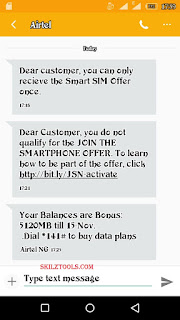
Airtel 5GB Free
There is an easier method using SMS.
This way is simple but you need patience and do it diligently not in a hurry. You have to;


  • Enter your text message 
  • Send "S" IMEI to 232 e.g S861143032390649 to 232
  • Then you will receive "Your phone is not provisional", kindly send JOIN to 141 immediately.
  • Then you will receive your Blazing 5GB data in this format " You have been rewarded 5GB for 30days on activation of the Airtel Data Terminal. ".
  • Then start blazing with your data.
You can check your data by dialling *140# and start Blazing!
NOTE: In this method of using SMS to tweak, you will have to analyze the IMEI also. When you tweak your IMEI using SMS method, you might receive "Dear customer, you cannot activate this offer twice" it means your IMEI is getting closer kindly analyze the IMEI again and if you receive "Dear customer, you are not qualify for the smartphone offer" kindly change the 4digits entirely and tweak it again.

Is it helpful? Do you encounter any problems or issues while trying to set this up kindly ask more questions and if it works for you kindly share your experience!

Available link for download

Read more »

Monday, January 23, 2017

cara mengatasi iPhone Says No Kartu SIM valid SIM Atau Kegagalan Kartu SIM

cara mengatasi iPhone Says No Kartu SIM valid SIM Atau Kegagalan Kartu SIM


Kompdroid - Hari ini saya akan memberitahu cara memperbaiki iPhone Says No Kartu SIM, valid SIM, Atau Kegagalan Kartu SIM. Ini adalah kesalahan yang paling umum yang setiap pengguna iOS telah dihadapi saat menggunakan perangkat Apple. Dalam hal ini Post, saya akan memberitahu Anda semua solusi yang mungkin untuk memperbaiki iPhone Says No Kartu SIM, valid SIM, Atau Kegagalan Kartu SIM dan banyak lagi. Mari kita proses.!


Perbaiki iPhone says NO Sim card?

Ini salah satu kesalahan yang merupakan salah satu yang paling umum dan menjengkelkan, mari kita mulai metode untuk memperbaiki iPhone Says No Sim Card.
 

Beralih Airplane Mode:

  •      Membuka Layar iPhone Depan Anda.
  •      Ketuk Pengaturan.
  •      Di bagian atas layar, Anda akan melihat Airplane Mode.
  •      Aktifkan mode Airplane, tunggu selama 15-20 detik.
  •      Sekarang Matikan mode Airplane.

Bantuan ini untuk memperbaiki data seluler, GPS atau isu Bluetooth, jadi ini juga membantu Anda memperbaiki iPhone mengatakan tidak ada kartu Sim.


Reboot iPhone Anda:
Sebuah sederhana akan mendapatkan sesuatu yang bekerja untuk Anda sebagian besar waktu, kadang-kadang karena beberapa kesalahan, Anda mengalami tidak ada masalah kartu sim pada perangkat iOS Anda. Mencoba reboot lembut akan memperbaiki hal-hal untuk Anda, Tekan dan Tahan tombol daya selama 4-5 detik. Ketika Anda melihat pop-up mengatakan "slide untuk matikan" hanya pergi dengan aliran dan mematikan perangkat Anda. Setelah perangkat Anda benar-benar off tunggu 1 menit dan kemudian menyalakannya. 

Melihat apakah kartu SIM Anda sudah terpasang dengan benar:
Ini hal yang harus dilakukan, menggunakan Pin dan mengambil nampan sim. Sekarang hati-hati memeriksa apakah kartu SIM Anda dengan benar ditempatkan atau tidak. Jika tidak maka menempatkan kartu SIM Anda dengan benar dan masukkan baki kartu SIM kembali. 

Coba kartu SIM lain:
Anda mungkin melihat ada kartu SIM pada perangkat Anda karena jaringan Anda, dalam hal ini, skenario terbaik adalah untuk mencoba kartu SIM lain dari jaringan yang berbeda untuk menentukan bahwa tidak ada kartu SIM adalah karena masalah jaringan atau lainnya. 

pengaturan operator update:

  •     Pergi ke pengaturan
  •     Tekan pada Umum
  •     Ketuk Tentang

Sekarang jika ada update dari operator Anda pengaturan Anda akan melihat pesan seperti yang ditunjukkan pada foto di bawah. Yang harus Anda lakukan adalah memperbarui mereka dalam rangka untuk memperbaiki iPhone mengatakan ada kesalahan kartu SIM.


Atur ulang pengaturan jaringan:
Ini adalah solusi yang paling berguna sampai sekarang, ikuti langkah-langkah di bawah ini untuk mengatur ulang pengaturan jaringan ke pengaturan default.

    
Buka Pengaturan> Umum> Reset> Reset semua pengaturan.
    
Masukkan kode sandi Anda.
    
Ketuk ulang semua pengaturan untuk mengkonfirmasi tindakan Anda.
Meng-upgrade iPhone Anda ke versi terbaru dari iOS:
Ketika pernah suatu iOS baru dirilis Apel Berhenti siging versi iOS tua dan orang-orang mulai mendapatkan masalah konektivitas dan banyak lagi. Untuk memperbarui perangkat iOS Anda ke versi terbaru mungkin membantu Anda memperbaiki iPhone mengatakan tidak masalah kartu SIM.

    
Buka Pengaturan> Umum> Software Update
    
Tekan Download dan Install atau Install Now ..

Perbaiki iPhone mengatakan kartu SIM tidak valid atau kartu SIM kegagalan:
Jika Anda mengalami iPhone mengatakan kartu SIM tidak valid atau SIM kegagalan kartu, Anda dapat mencoba langkah-langkah berikut untuk memperbaiki masalah ini.
Langkah 1. Restart perangkat Anda.
Langkah 2. Keluarkan baki kartu SIM dan memeriksa kartu SIM Anda dengan benar ditempatkan.
Langkah 3. Coba gunakan SIM operator lain untuk memastikan itu bukan masalah operator.
Langkah 4. Ulang pengaturan netwrok Anda ke default.
Langkah 5
. Memperbarui perangkat ke perangkat iOS terbaru.
Langkah 6. Pabrik ulang perangkat Anda menggunakan iTunes.


iPhone mengatakan ada Sim, kartu SIM tidak valid atau kegagalan kartu SIM setelah update iOS:

  •      Restart perangkat Anda.
  •      Keluarkan baki kartu SIM dan memeriksa kartu SIM Anda dengan benar ditempatkan.
  •      Coba gunakan SIM operator lain untuk memastikan itu bukan masalah operator.
  •      Ulang pengaturan netwrok Anda ke default.
  •      Memperbarui perangkat ke perangkat iOS terbaru.
  •      Pabrik ulang perangkat Anda menggunakan iTunes.

kartu iPhone Tidak Sim diinstal, kartu SIM tidak valid atau kegagalan kartu SIM setelah kerusakan air:

Jika Anda menghadapi masalah seperti itu, saya akan menyarankan Anda untuk pergi ke toko Apple dan biarkan terlihat oleh para profesional. Jangan mencoba untuk menjadi pahlawan!


Available link for download

Read more »